The reply on your support case is short and polite: AWS can't grant your SES production access request. It gives no reason. Your code sends fine to the one address you verified, and the demo is on Monday.
A denial with no reason given is a familiar story in user reports, and it isn't personal. The AWS production-access page lists the request's fields and promises an initial response within 96 hours, but it names no reasons for a denial. AWS doesn't say what it weighs. The only request inputs it documents are a short form and your website URL, and user reports add a third: your replies on the case. All three have to back the checkbox you ticked: you mail only people who asked, and you handle bounces and complaints.
The short version: finish domain authentication, bounce handling and opt-in first, write facts a reviewer can check on your site, and after a no, reply on the same case with what you've already changed.
Stamp0 publishes this blog, so you'll find us in the worked example near the end. AWS's figures and rules below are as of November 2026, checked against the pages we link. If you were about to paste your first message into a fresh case, read the denial section before you do.
What the request actually asks for
The request is a form, not an essay. The AWS docs list five items:
- Mail type. Marketing or Transactional, whichever is most of your mail. Marketing is one-to-many promotional content to a targeted list; transactional is one-to-one and unique to each recipient, usually triggered by something they did, like a purchase or a password reset.
- Website URL. AWS uses it "to help us better understand the kind of content you plan on sending."
- Additional contacts. Up to 4 addresses, comma-separated.
- Contact language. English or Japanese.
- The acknowledgement. A checkbox agreeing that you send only to people who explicitly asked for your mail, and that you have a process for bounce and complaint notifications.
The CLI sends the same thing in one call, per Region:
aws sesv2 put-account-details \
  --region us-east-1 \
  --production-access-enabled \
  --mail-type TRANSACTIONAL \
  --website-url https://example.com \
  --additional-contact-email-addresses ops@example.com,founder@example.com \
  --contact-language EN
Notice what isn't there: a box for your use case. The UseCaseDescription API field is deprecated, and the current console steps in the docs list no free-text field. So your write-up lives in two places: on the website your URL points to, and in your reply on the support case. If your console still shows a use-case box, paste the same text there.
Once you submit, the details lock: you can't edit them while the review is open.
Until then you're in the sandbox: verified recipients only, 200 messages per 24 hours, one per second, separately in each Region. Our guide to leaving the SES sandbox covers the limits and the console clicks.
Now read the checkbox again, slowly, since it's easy to tick it like a cookie banner. It's your whole request in one sentence. Everything else you send AWS is evidence that it is true.
What AWS is checking (from its own pages)
The production-access page names no criteria. The closest thing to a published rubric sits on a different page, the AWS enforcement FAQ, in what AWS asks senders it reviews over unsolicited mail. That is a different review, not your request, but the questions come from AWS itself, so we use them as the proxy. AWS wants three answers:
- Did every recipient specifically request your messages?
- How did you get the addresses?
- How do subscribing and unsubscribing work? AWS asks for the opt-in and opt-out links.
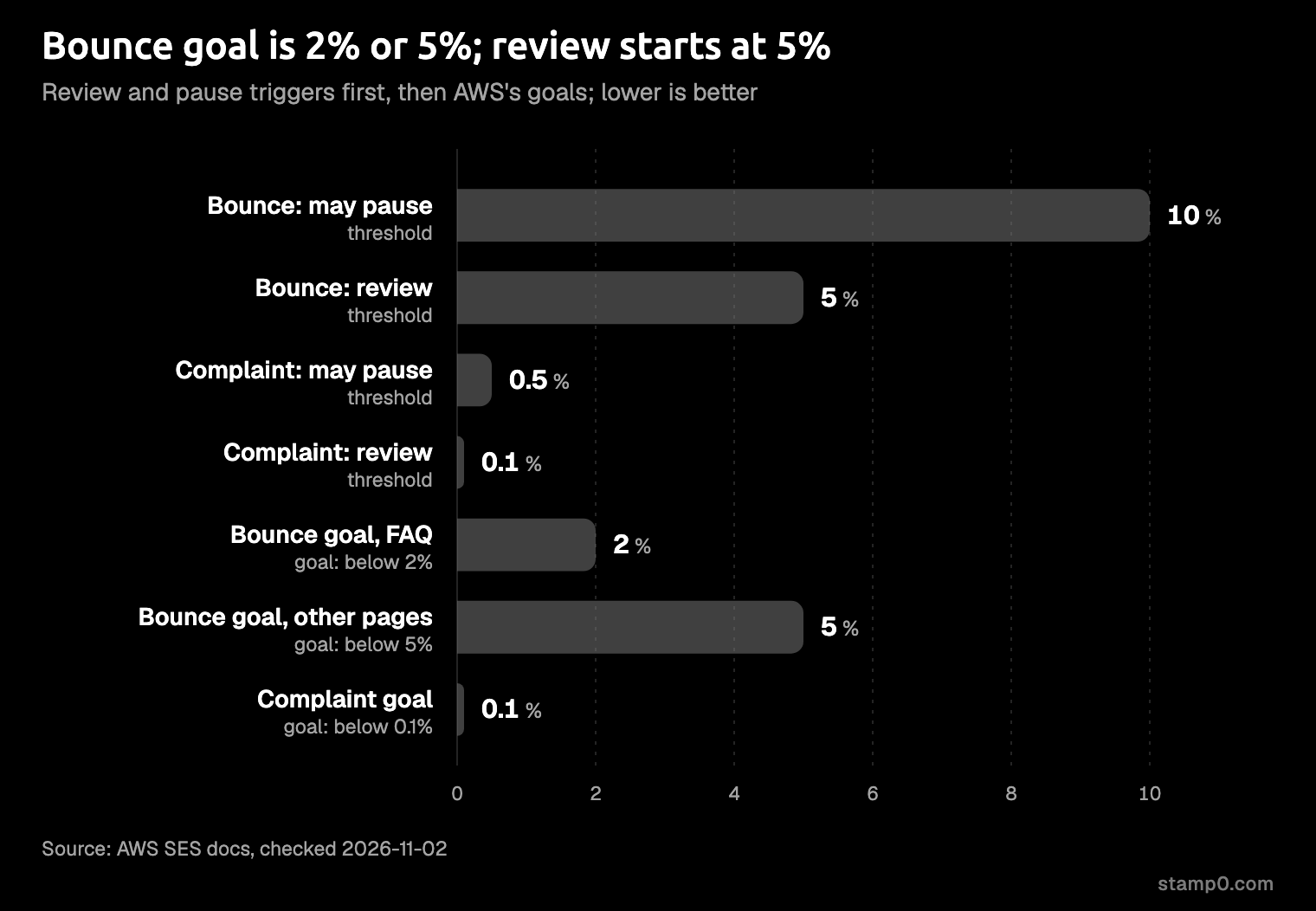
"A process" has numbers behind it. AWS puts an account under review at a 5% bounce rate or a 0.1% complaint rate, and may pause its sending at 10% or 0.5%. The bounce target depends on the page you read: the reputation-messages and success-metrics pages say keep it below 5%, while the sending-review FAQ says below 2%. Both agree on complaints: below 0.1%.
Aim for the stricter bounce number and you'll still find the complaint line is the one that bites. It sits far closer to zero, and on a small list a few complaints can move it.
Outside the AWS pages, you're reading reports. An AWS Builders article on DEV Community, written from its authors' experience, lists likely denial reasons. They include a website or domain that does not look real, a new or $0-spend account, no sending address, no authentication or unsubscribe described, cold outreach or marketing, boilerplate text, and free-mail domains. On r/aws, commenters on a denied request said AWS will want proof that your bounces and unsubscribes are automated and tested. None of that is AWS policy, and all of it is worth reading.
Our reading of those reports, and of AWS's silence: a denial looks less like "you're a spammer" and more like "we can't tell from here." So your request has to make your setup visible from the outside. The cheapest item on the AWS Builders list to fix is the free-mail one: give AWS contact addresses on your own domain.
Set this up before you ask
Verify the domain with Easy DKIM
AWS says verifying your domain before you request production access "helps to get your production access request approved faster." Easy DKIM, the signing SES manages for you, gives you three CNAME records and a 2048-bit key by default. DNS changes can take up to 72 hours to propagate, and the identity reads Verified once SES finds all three records.
Start this one first: it's the step that waits on DNS, not on you.
Custom MAIL FROM and DMARC alignment
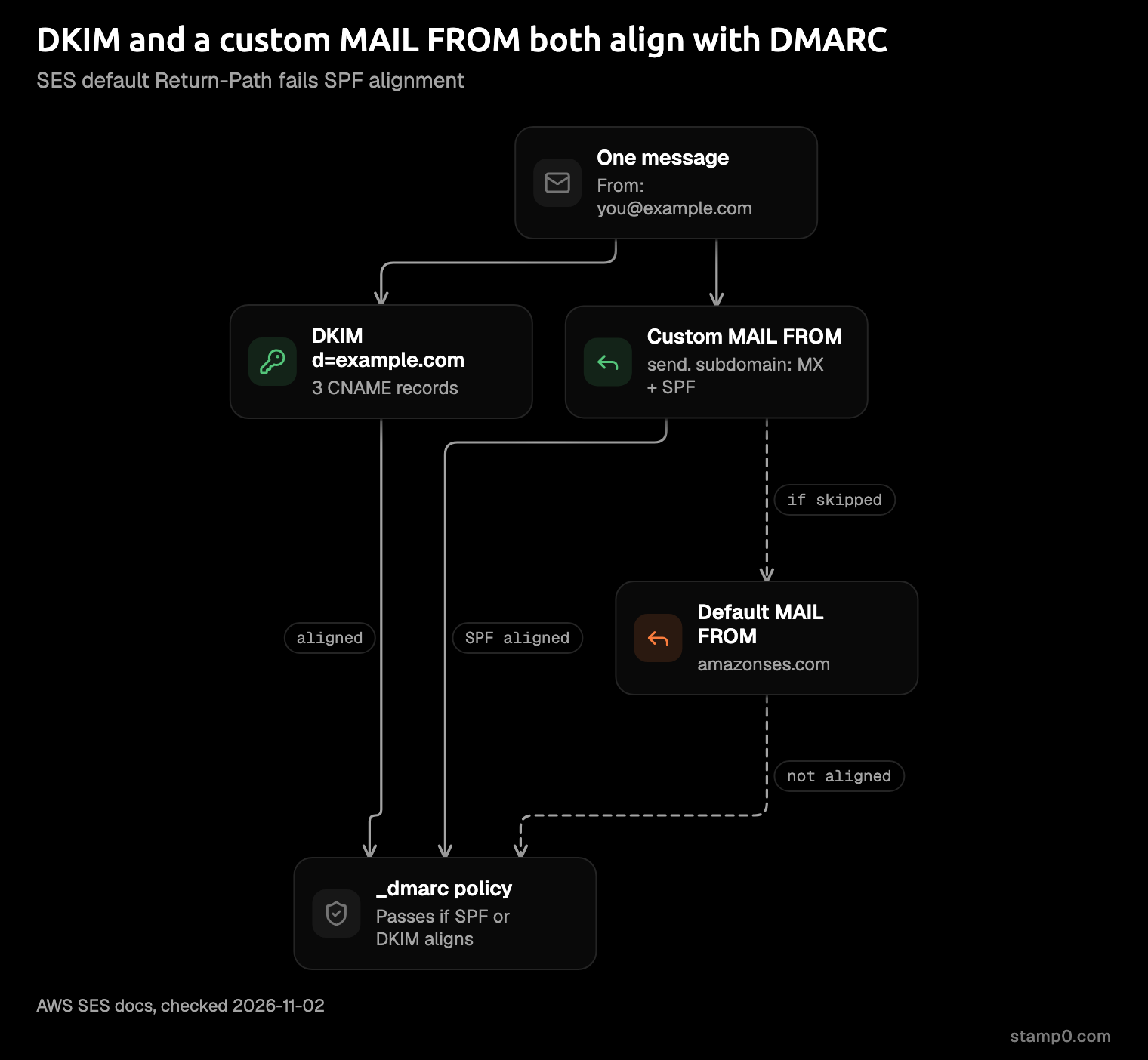
By default, the SES MAIL FROM domain (the bounce address, which shows up as Return-Path) is an amazonses.com subdomain. That means SPF can pass for an Amazon domain but cannot align with yours. Alignment is the DMARC rule that the domain which passed SPF or DKIM must match the domain in your From line.
The fix is a custom MAIL FROM on a subdomain you don't send from or receive on, such as send.example.com. It takes exactly one MX record and an SPF TXT record. DMARC passes if either SPF or DKIM aligns, and AWS suggests rolling your policy out as p=none, then quarantine, then reject.
; DKIM: three CNAMEs, names and values copied from SES
<selector-1>._domainkey.example.com  CNAME  <value from SES>
<selector-2>._domainkey.example.com  CNAME  <value from SES>
<selector-3>._domainkey.example.com  CNAME  <value from SES>

; Custom MAIL FROM: exactly one MX, plus SPF
send.example.com  MX   10 feedback-smtp.<region>.amazonses.com
send.example.com  TXT  "v=spf1 include:amazonses.com ~all"

; DMARC: start at p=none
_dmarc.example.com  TXT  "v=DMARC1; p=none; rua=mailto:dmarc@example.com"
DKIM alone is enough to pass DMARC. The custom MAIL FROM is what makes both align, and it's what anyone reading your headers sees: your domain on the bounce address, not Amazon's.
Bounces, complaints and the suppression list
This is the part the checkbox makes you attest to, and the AWS reputation page says every SES account must have the process. Wire the SES bounce and complaint notifications to code that updates your list, then test it with the mailbox simulator. If you use Stamp0, those events arrive as webhooks.
Only hard bounces to domains you haven't verified count toward your bounce rate; soft bounces, the mailbox simulator, and bounces from your verified addresses don't. Complaints count only from mailbox providers that send feedback to SES, and Gmail doesn't.
On a mostly Gmail list, a low complaint rate may just mean SES isn't being told.
Accounts that started on SES after November 25, 2019 use the account-level suppression list by default for bounces and complaints. Addresses stay on it until you remove them. In the sandbox, though, bulk actions and the suppression-management API calls are off, so importing an old list waits until you're out.
The enforcement FAQ is blunt about the rest. On a hard bounce, remove the address and stop sending. On a complaint, do the same, and "do not even send an email that says you've received the request to unsubscribe."
The polite "sorry to see you go" note is exactly the email AWS tells you not to send.
Opt-in and one-click unsubscribe
AWS recommends double opt-in, where a new subscriber clicks a confirmation link before you add them. It lists purchased or rented lists as prohibited by its terms, and the enforcement FAQ says it plainly: "Don't buy, rent, or share email addresses."
For marketing mail, add two headers, in this order: List-Unsubscribe with a URL or mailto, then List-Unsubscribe-Post for one-click (RFC 2369 and RFC 8058).
List-Unsubscribe: <https://example.com/unsubscribe?id=abc>, <mailto:unsubscribe@example.com>
List-Unsubscribe-Post: List-Unsubscribe=One-Click
SES subscription management can add them when you pass ListManagementOptions, for single-recipient sends only, and not if you sign DKIM yourself. AWS also says the Gmail and Yahoo bulk-sender rules, in force since February 2024, apply to SES senders outside the sandbox. Gmail counts you as a bulk sender at 5,000 messages a day to its users, and Yahoo wants one-click unsubscribes honored within 2 days. Stamp0's compliance docs list what it adds to marketing mail.
If a newsletter is in the plan for next quarter, say so now and show the signup form. A transactional request that grows a newsletter later is a surprise you're better off explaining up front.
A request write-up you can adapt
Write facts a reviewer can check from your site in a minute. Adjectives don't count.
Put the text below on the about or email-policy page of your website, and make sure the URL you give AWS reaches it. Then paste it into your reply on the case. Fill in the bracketed parts, and delete the # Purpose lines before you publish: they're notes for you, not for AWS.
<Company>: Amazon SES production access, <Region>

Who we are
<Company> makes <product>, <what it does, one line>. <https://example.com>
# Purpose: ties the request to a real site the reviewer can open.

What we send
Mostly <transactional | marketing>: <password resets, receipts, sign-in links>.
Marketing, if any: <what, how often, to whom>.
# Purpose: backs the mail type you picked with examples.

Who receives it, and how they asked
<Users who created an account | subscribers who confirmed by double opt-in at <URL>>.
We never buy, rent, or share addresses.
# Purpose: answers AWS's first question, did every recipient ask.

Expected volume
About <N> a day now, <N> a day by <month>.
# Purpose: a quota you can justify. Quotas count recipients, not messages.

Domain and authentication
<example.com> verified with Easy DKIM. Custom MAIL FROM on <send.example.com>.
DMARC at _dmarc.<example.com>, policy <p=none, moving to quarantine>.
# Purpose: shows the identity work is done, not planned.

Bounces and complaints
SES bounce and complaint events go to <endpoint>. Hard bounces and complaints
are removed and suppressed automatically, with no follow-up email. Tested with
the SES mailbox simulator.
# Purpose: the second half of the checkbox, in detail.

Unsubscribe
Marketing mail carries List-Unsubscribe and List-Unsubscribe-Post (one-click)
plus a footer link at <URL>. Opt-outs stop mail <immediately>.
# Purpose: how unsubscribe works, which AWS asks about.

Contacts
<ops@example.com>, <you@example.com>, all on our own domain.
# Purpose: people at your domain AWS can reach.
Every bracket should end up holding something a stranger could check: a URL, a record name, a setting. For volume, AWS publishes no number to aim for; its docs say your quota and sending rate "vary based on your specific use case." You can ask for a higher quota in the same request, and quotas count recipients, not messages. So state what you send now and what you expect, and let the sections around it do the justifying.
The AWS Builders authors advise a justification of about 1,000 words. We'd rather you write fewer words with more links, since a link is the one claim a reviewer can verify. "We follow all best practices" tells them nothing; name the practice and link to it.
Our bet: the request AWS is most likely to approve is one it can check.
If AWS says no
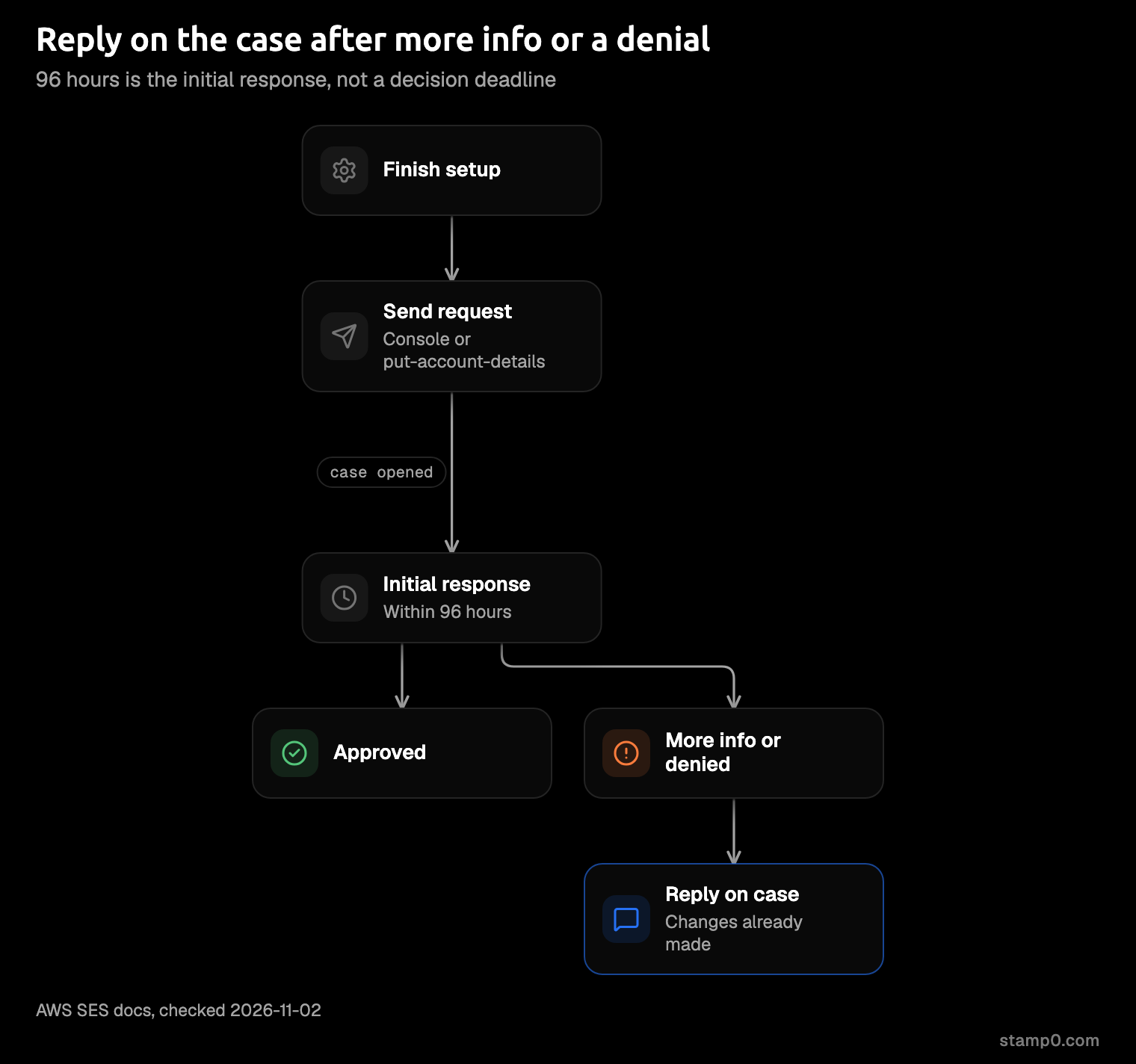
AWS documents no appeal for production access. What it does document, in the sending-review FAQ, is how to answer a review. Give the root cause, the changes "you've already implemented, not the steps you plan to implement," and how they stop a repeat. That FAQ is written for accounts under enforcement review, not for this request, but it's the best second-message template AWS has published.
- Reply on the same case. That's where AWS's review FAQ sends your answer. The pages we link don't rule out a new case, but keep your fix next to the feedback it answers. A second
put-account-detailscall while a review is open returns a 409 conflict, so don't stack requests. - Fix first, then write. Finish the setup above before you reply, since AWS asks for changes already made.
- List each change with a link: the policy page, the DNS records, the unsubscribe flow, the bounce handler.
- Explain how each change prevents a repeat.
- Answer every point the case feedback raises.
User reports point the same way. On r/aws, an AWSSupport account told a denied sender it can't advise whether a future request would succeed. It said the SES team decides through the support case, and commenters added that there's no separate escalation path.
Escalating somewhere else, in other words, just means waiting somewhere else. Make your second message longer than the first, and put links in it.
Worked example: drafting it with Stamp0
Stamp0 can't wave you through the sandbox, because SES in your own AWS account sends the mail, and that account needs production access like any other. What it can do is stop you writing the request from memory. You connect AWS with one CloudFormation stack, and from there:
- Domain records. Stamp0 writes the three DKIM CNAMEs, plus a
send.MAIL FROM with its MX and SPF records. If the domain has no DMARC policy yet, it adds a_dmarcTXT atp=none. On Route 53 the stack option does this automatically; on Cloudflare DNS, connect Cloudflare and click Publish on Cloudflare. Anywhere else you get a copy-paste list. Then Stamp0 polls until SES verifies them. The domains docs show each record, and thebounce.option on Route 53. - Sandbox status. The dashboard shows whether the account is still in the sandbox, and its quota.
- The draft. Over the MCP server,
stamp0.sandbox.preparedrafts the request from the account's real setup: the console steps, the use-case text, and theaws sesv2 put-account-detailscommand. It never submits anything. - Rates and headers. Stamp0 shows bounce and complaint rates against the SES review thresholds, and every marketing email carries
List-Unsubscribeand the RFC 8058 one-click header, DKIM-signed.
Three things stay yours: the policy page on your website, your opt-in flow, and the code that cleans your list when a bounce event arrives.
Read the draft against the template above, fix anything that doesn't match your setup, and send it yourself. AWS decides.
Sending while you wait
The sandbox blocks unverified recipients, not your product. While the case is open, you can point a domain's transactional mail at Cloudflare Email Service in your own Cloudflare account, on the same Stamp0 API.
Password resets don't care which pipe they arrive through.
The limits are Cloudflare's. Its rule is transactional only, and bulk mail can disable sending for your whole Cloudflare account. You need Workers Paid at $5 a month and the zone on Cloudflare DNS, and Cloudflare sets a daily quota it doesn't publish. Messages top out at 5 MiB, there's no open or click tracking, and Stamp0's own cap on this route is 2 sends a second. Connect Cloudflare has the setup, and our provider terms explain the transactional-only rule.
Marketing mail waits for SES. On r/aws, some commenters suggested sending through Resend or Postmark in the meantime.
FAQ
How long does SES production access take?
AWS Support gives an initial response within 96 hours. That's when AWS first answers, not when it must decide: access comes in that window if AWS can grant it, and later if it needs more information from you.
Can I appeal an SES production access denial?
There's no documented appeal. Reply on the same case with the changes you've already made; the steps are in the denial section above.
Do I need to request production access in every Region?
Yes. Sandbox status is unique to each AWS Region, and so are sending quotas. Production access in one Region means nothing to the next, so request it everywhere you send from.
Start with the setup
A request is easier to write once the things it describes exist. Start with the quickstart: connect AWS, verify a domain with DKIM, MAIL FROM and DMARC, then ask stamp0.sandbox.prepare for the draft. Stamp0 is free up to 50,000 emails a month, and AWS bills the sending in your own account.