Your Resend invoice just crossed a tier, so you searched "resend alternative" and got a page of roundups. Several were written by a company on the list, and that company won. This one is no different, and we will say so up front: Stamp0 publishes this blog, and Stamp0 is our pick.
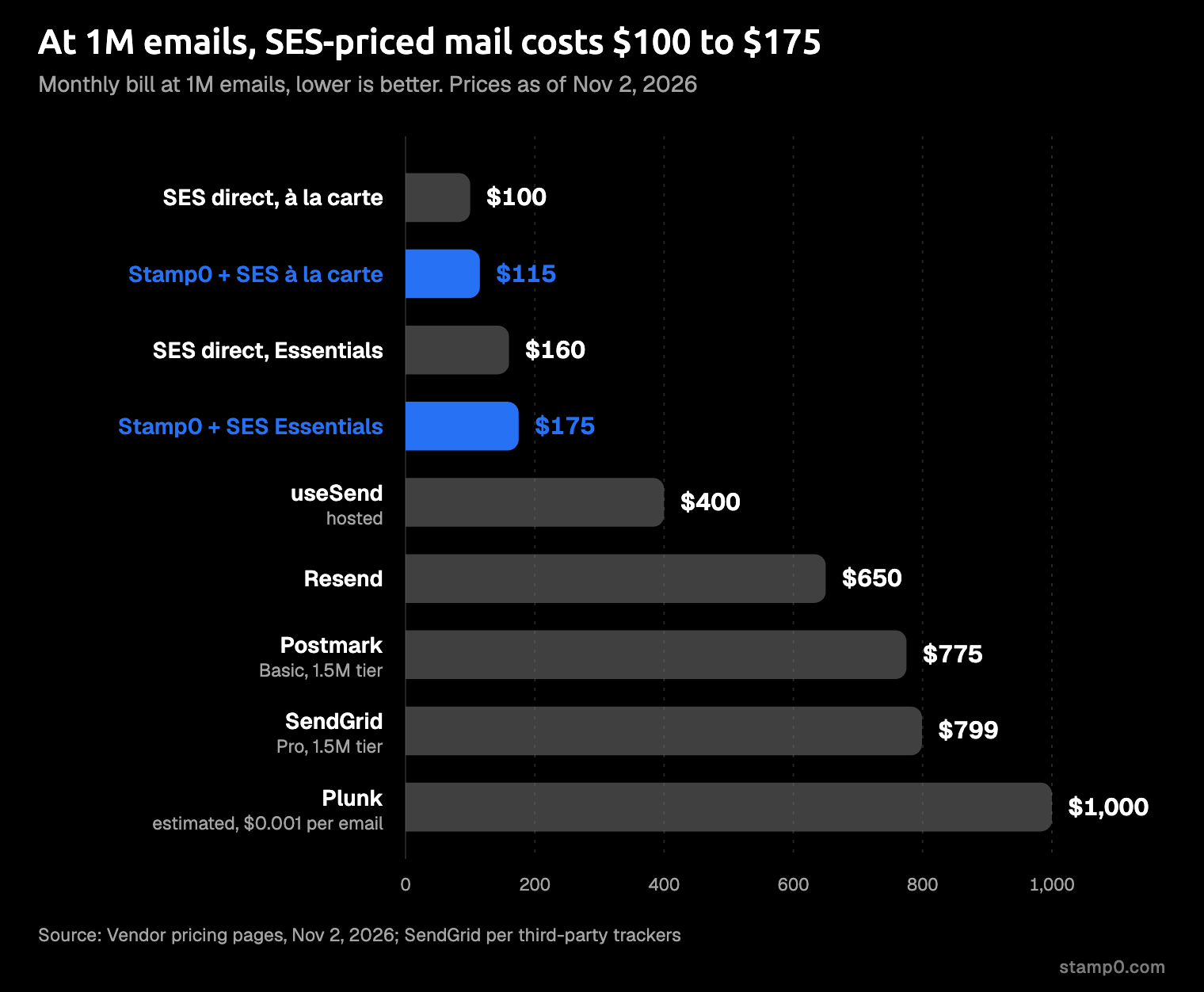
The reason fits in one line. Stamp0 keeps the Resend API and sends through Amazon SES in your own AWS account. You pay SES's $0.10 per 1,000 emails, plus a flat $0 to $49 a month to us. At a million emails a month that's $115 on SES's à la carte plan, or $175 on Essentials, the plan new AWS accounts now start on, against $650 on Resend.
The rest is the evidence, including the rows where we lose. Every option gets a worked bill at 50k, 100k and 1M emails a month, plus what switching costs you in code, DNS and webhooks.
The short answer: which Resend alternative fits
- Stamp0: best overall if you like Resend's API and want SES prices. It's the only option in this list that keeps the Resend API.
- Amazon SES direct: cheapest per email, if you'll run the console and parse inbound mail yourself.
- Postmark: best if you want nothing in AWS and your transactional and broadcast mail kept apart.
- SendGrid: best if you want one vendor for the API and marketing campaigns at mid volume.
- Mailgun: best for apps that need SMTP and an API, with US or EU sending from one account.
- Loops: best for marketing-led SaaS that counts contacts, not sends.
- useSend: best if you'd rather run an open-source sender on SES yourself.
- Plunk: best for small volumes on one simple per-email price, with self-hosting optional.
Sending basics have converged, and a feature grid is mostly a column of checkmarks. Pick on the bill and the switching cost, and the shortlist gets short fast.
Resend alternatives compared: the bill at 50k, 100k and 1M
At a million emails a month, the same mail costs anywhere from $100 to about $1,000, depending on who you pay and how they charge.
Each option is priced on the cheapest plan that covers the volume, at list prices as of November 2, 2026. Resend sits in the first row for reference. Stamp0 and SES direct each get two rows, because the SES plan your AWS account is on changes the bill.
| Option | 50k a month | 100k a month | 1M a month |
|---|---|---|---|
| Resend, for reference | $20 (Pro) | $35 (Pro) | $650 |
| Stamp0 + SES à la carte | $5 | $25 | $115 |
| Stamp0 + SES Essentials | $8 | $31 | $175 |
| SES direct, à la carte | $5 | $10 | $100 |
| SES direct, Essentials | $8 | $16 | $160 |
| Postmark Basic | $55 | $115 (125k tier) | $775 (1.5M tier) |
| SendGrid | $19.95 (Essentials, per trackers) | $34.95 (Essentials, per trackers) | $799 (Pro, 1.5M tier, per trackers) |
| Mailgun | $35 (Foundation) | $90 (Scale) | Not published; quote only |
| Loops | Priced by contacts: Growth is $49 for up to 5,000 | No email-volume price | No email-volume price |
| useSend hosted, transactional | $20 | $40 | $400 |
| Plunk hosted | About $50 | About $100 | About $1,000 |
Stamp0's rows are the whole bill: the flat Stamp0 fee (Free up to 50,000, then Pro at $15) plus what AWS charges to send. Postmark has no 100k or 1M tier, so its row shows the tier you'd buy. SendGrid's per-tier prices come from third-party trackers, not the Twilio page, and Mailgun publishes no price from 250k to 1M.
The million-email column is where the gap lives. Below 100k the differences are lunch money; at a million they're a line item someone in finance will ask you about.
Find your row, find your volume, and do the subtraction. That number is what a migration has to be worth to you.
Price is half the decision. The other half is what you'd rebuild: the API your code calls, inbound mail, marketing, and anything you'd have to keep running.
| Option | Keeps the Resend API | Inbound | Marketing | What you host | Switching cost |
|---|---|---|---|---|---|
| Stamp0 | Yes: change the key and base URL | Inboxes and threads, raw mail in your S3 | Contacts and campaigns in the flat price, 10,000 contacts on Pro | Nothing; one AWS stack, about $0.40 a month | Two settings, DNS, webhooks recreated at the same URLs |
| SES direct | No | Raw MIME to S3 or SNS; parsing is yours | You build it | Nothing, but you build the missing layer | New SDK or SMTP, DNS, webhook remap |
| Postmark | No | Pro and Platform plans | Broadcast streams, kept apart | Nothing | New SDK, DNS, webhook remap |
| SendGrid | No | Inbound Parse webhook | Marketing Campaigns, from $15 a month extra | Nothing | New SDK, DNS, webhook remap |
| Mailgun | No | Routes: 1 on Free, 5 on Basic, full on Foundation | Not covered in our research | Nothing | New SDK or SMTP, DNS, webhook remap |
| Loops | No | No inbound API | The core product, priced by contacts | Nothing | New API, templates rebuilt, DNS |
| useSend | Not claimed | Listed in its README | $0.001 per marketing email | Optional: a database, Redis and AWS credentials | New SDK or SMTP, DNS, webhook remap |
| Plunk | Not described | Webhook, all plans | Campaigns and automations | Optional, open source | New SDK or SMTP, DNS, webhook remap |
How we priced it
We priced the cheapest plan that covers each volume, at list price as of November 2, 2026: transactional mail only, with no dedicated IPs, add-ons or attachments (SES bills attachments at $0.12 per GB on top). Where a vendor has no tier at 100k or a million, we name the tier you'd actually buy, not a blend of two that nobody sells. Figures from third-party trackers, or from our own arithmetic, say so where they appear.
One trap sits under every SES row. Since July 21, 2026, new AWS accounts start on SES Essentials at $0.16 per 1,000 emails, not à la carte at $0.10. The same goes for an account that hasn't used SES in a region since June 1, 2025. You switch plans in the AWS console. If AWS put you on Essentials by default, your first move down to à la carte takes effect immediately; other downgrades wait for the next billing cycle.
If you never picked a plan, you'll meet Essentials on the first invoice, as a per-email line a little higher than the one you budgeted. Amazon SES pricing explained walks through the plans, and what changed in July 2026 covers who should switch back.
1. Stamp0: the Resend API on your own AWS
Stamp0 is our product, so read this entry knowing who wrote it. The plans and a cost explorer are on pricing if you want to check our math.
It suits teams on Resend who like the API and watch the bill climb with volume. Stamp0 serves the Resend API, and Amazon SES in your own AWS account sends the mail: the Resend API on your own AWS, with nothing to host.
Switching is two settings. You keep the Resend SDK and change where it points:
# .env
RESEND_API_KEY=your-stamp0-key
RESEND_BASE_URL=https://api.stamp0.com
Your send calls stay as they are. Then you verify your domain again, so SES can sign your mail, and recreate your webhooks at the same URLs; the payloads match. Compatibility is verified with the official Node client, resend@6.32.0, and other Resend SDKs are untested.
The cheapest migration is the one where the code doesn't change. Here the diff is two lines in a .env file, which is about as short as a pull request gets.
The bill. Stamp0's part is flat and sits on top of what AWS charges: $0 on Free, $15 on Pro, $49 on Scale, per workspace, never per email. Free covers exactly 50,000 emails a month and then answers with a 429, so anything above that needs Pro. A million emails is $15 to us plus $100 to AWS on à la carte, or $160 on Essentials, and your AWS credits pay the AWS part.
Inbound and marketing. Received mail arrives as inboxes and threads behind a Messages API, and the raw MIME sits in your S3 bucket. Resend includes 3 inboxes on every plan, Free too; Stamp0 Free has 1 and Pro has 10. Marketing lives in the same flat price: contacts, lists, segments, campaigns and sequences, with 10,000 contacts on Pro. For comparison, Resend charges $40 for 5,000 marketing contacts and Loops Growth $49. The inbound and marketing docs have the details.
What you host. Nothing. One CloudFormation stack in your account sets up a least-privilege role, event routing and an S3 bucket, and costs about $0.40 a month to run. Bodies, attachments and raw inbound stay in your S3; reputation, suppressions and quotas stay in your AWS account. If you leave, SES keeps sending, because it was yours all along.
What doesn't carry over. A few Resend features don't map, and these are the ones you'd notice:
- Resend automation bodies, their run, stop and duplicate endpoints, and event definitions.
contact.*,topic.*andsuppression.*webhooks, which are accepted but not delivered.- Logs keep the latest delivery attempt only, and log bodies come back null.
- No
reactfield: the Node SDK renders React Email to HTML before sending, so your React Email code keeps working there. - IDs are prefixed (
em_…), which matters if you parse them.
The migration guide covers each one, and Stamp0 vs Resend has the full comparison.
Where it falls short:
- SES direct is $0 to $15 a month cheaper. That $15 buys the Resend API, DNS written for you, an event log and inbound threads.
- You need an AWS account, and new SES accounts start in the sandbox. The stack is one click, and Stamp0 drafts the production-access request for you to submit. Low-volume transactional mail can skip AWS and go through your Cloudflare account instead, on Workers Paid at $5 a month. Cloudflare sets an unpublished daily quota (reviewers report about 1,000 a day on new accounts), Stamp0 caps it at 2 sends a second, and it carries no marketing mail and no open or click tracking.
- Two bills instead of one. Past Resend's free tier, the two together still come in under one Resend bill.
- No SMTP. Stamp0 is HTTPS only, through the Resend SDKs or curl; an SMTP-only app should stay on Resend or move to SES direct for now.
- Resend runs its own IP pools. On SES you send from AWS's shared pools or rent a dedicated IP at $24.95 a month, where Resend charges $30 for one on Scale.
- Stamp0 went live in October 2026. Free runs to 50,000 emails a month, so run it beside Resend first and move traffic when you trust it.
Pick it when you like Resend's API, you're past the free tiers, and you'd rather pay AWS prices than rewrite your sending code.
2. Amazon SES direct
SES is the engine under several entries in this list, and you can also rent it straight from AWS. It suits teams that already live in AWS and have an engineer willing to build the layer the console leaves out.
The price is the lowest here. On the SES pricing page, sending costs $0.10 per 1,000 emails on à la carte and $0.16 on Essentials. Receiving costs $0.10 per 1,000 emails plus $0.09 per 1,000 incoming chunks, and a dedicated IP is $24.95 a month.
The console leaves four jobs to you:
- Domain records by hand. DKIM CNAMEs, plus a custom MAIL FROM: the domain on your bounce address, which lets SPF line up with your From domain.
- Event plumbing. A configuration set (the named bundle of rules SES applies to each send) with event destinations in SNS or EventBridge, plus somewhere to store events so you can answer "did it arrive?"
- Inbound parsing. SES hands you raw MIME in S3 or SNS; parsing and threading are yours.
- The rest of the dashboard. A view of your suppression list, and the sandbox request.
A new SES account can send only to verified recipients, 200 emails per 24 hours at 1 per second, until AWS grants production access. Then you wait up to 96 hours for someone at AWS to read your paragraph about bounce handling. The sandbox guide covers what to write.
SMTP is there if your app needs it: SES offers an SMTP interface alongside its API, with SMTP credentials per region. Moving from Resend means the AWS SDK or SMTP in your code, new DNS records, and your webhooks rebuilt around SES's events.
SES is the cheapest mail you can buy and the most work you can do for it. Stamp0 vs the Amazon SES console lists that work item by item. If you'd rather pay $15 a month than build it, see the entry above.
3. Postmark
Postmark is a per-email provider built around transactional mail. It suits teams who want nothing in AWS and their broadcast mail kept apart from password resets. Broadcasts run through separate Message Streams, with no separate price published.
Postmark sells fixed monthly tiers, and none of them sits at 100k or a million, so the table shows the tiers you'd buy: 125k and 1.5M. Pro and Platform cost more at every tier, and the Postmark pricing page has the full grid.
At 100k a month you're paying for the 125k tier and leaving the rest of it on the shelf.
Overage on Basic is $1.80 per 1,000 on the 10k to 125k tiers and $1.70 from 300k up. Inbound comes with Pro and Platform, and received mail counts toward your volume. History stays 45 days by default, up to 365 on Pro and above. The free plan is 100 emails a month, with no overage and no inbound.
Switching to Postmark means its own SDK, fresh DNS records and webhooks mapped to Postmark's events.
You pay Postmark for focus. If you want nothing in AWS at all, it's the strongest pick in this list.
4. SendGrid
SendGrid, Twilio's email API, suits teams that want sending and marketing campaigns from one vendor. Twilio lists Essentials from $19.95 a month and Pro from $89.95, with Premier priced on request. There's a free trial for 60 days at 100 emails a day.
The Twilio page shows the volume tiers but not the price at each one, so the per-volume figures here come from third-party price trackers. They put Essentials at $19.95 for 50k and $34.95 for 100k, and Pro at $799 for the 1.5M tier, as read on October 2, 2026. One tracker says $29.95 at 100k instead, so check the slider on the Twilio pricing page before you budget.
Marketing Campaigns adds from $15 a month. Pro includes one dedicated IP, with more as an add-on. Per third-party reviews, inbound arrives through the Inbound Parse webhook, which hands you the mail and stores nothing. Moving over, you'd adopt SendGrid's SDK, add its DNS records and remap your webhook events.
SendGrid is fine at 50k. The jump to Pro, from $89.95, is where the bill moves.
The trial ends on day 60, which tends to be the week you'd stopped thinking about email.
5. Mailgun
Mailgun suits apps that send over SMTP or need EU sending: it offers an HTTP API and SMTP, with US or EU sending from one account. On the Mailgun pricing page, Foundation is $35 for 50k and Scale is $90 for 100k. One tracker lists Foundation at $75 for 100k, which the page doesn't show. From 250k to 1M there's no published price, and Enterprise is a quote.
Below that, there's a free plan at 100 a day and Basic from $15 for 10k. Overage runs from $1.80 per 1,000 on Basic, $1.30 on Foundation and $1.10 on Scale. Across Postmark and Mailgun, overage sits between $1.10 and $1.80 per 1,000, against $0.10 at AWS.
Inbound uses Routes: 1 on Free, 5 on Basic, the full set on Foundation. Logs last 1 day on Free and Basic, 5 days on Foundation and 30 on Scale. On the cheaper plans, Monday's support ticket about Saturday's email finds nothing to look at.
If your app already speaks SMTP, switching to Mailgun is new credentials and DNS; otherwise it's a new SDK and remapped webhooks as well.
Mailgun is the SMTP-and-API workhorse of this list. Above 100k, the price is a sales call.
6. Loops
Loops suits marketing-led SaaS that wants lifecycle email with transactional mail included. It's priced by contacts, not email volume, so a bill per email count doesn't apply.
Free covers 1,000 contacts and 4,000 sends per rolling 30 days, transactional included, with a "Powered by Loops" footer. Growth is $49 a month for up to 5,000 contacts, with unlimited marketing and transactional sends, per the Loops pricing page.
A 5,000-contact list costs the same whether you email it once a month or every morning. That is the appeal, and counting contacts instead of emails for the first time is a small, strange relief.
Per third-party reviews, there's no inbound API, and templates are built in the Loops editor or in MJML. So switching means rebuilding your templates, plus new DNS and a new API in your code.
Against Stamp0: Pro holds 10,000 contacts for $15 a month plus AWS's sending cost, next to transactional mail on the Resend API.
It's a different meter. If your list is small and your sends are big, Loops can win.
7. useSend
useSend is an open-source sender (AGPL) that sends through Amazon SES, with SMTP, webhooks, marketing and inbound listed in its README. It suits teams that want an open-source sender on SES and are happy to host it, or to pay for the hosted plan.
The useSend site lists no hosted free tier: the free option is self-hosting, where you pay AWS directly. Hosted use starts at a $10 monthly minimum, which covers your first $10 of sending; after that, transactional mail costs $0.0004 per email and marketing $0.001.
Self-hosting needs a database, Redis for the queue and your AWS credentials. There's no license fee, but you still pay AWS and keep a Redis instance alive, which is its own kind of invoice.
The project doesn't claim Resend API compatibility, so you'd change SDK or move to SMTP, add its DNS records and remap your webhooks.
It's the closest in spirit to Stamp0's idea of keeping the data plane in your AWS, with the hosting on you.
8. Plunk
Plunk suits small senders who want one per-email price with campaigns and inbound included. On the Plunk pricing page, it charges $0.001 per email with no base fee and 1,000 free a month, and every plan includes transactional, campaigns, automations, inbound (as a webhook) and SMTP. It's open source under the AGPL, and self-hosting is free.
Per third-party reviews, inbound mail counts toward usage, so a chatty support inbox shows up on the bill.
Plunk calls itself an open-source Resend alternative but describes no Resend API compatibility. Expect to rewrite your send calls, add DNS records and remap webhooks.
A tenth of a cent per email looks like nothing on a side project. At a million emails, it's the biggest published bill in this list.
Plunk is simple until volume.
Also named: MailPace, Sendy and others
Your shortlist is probably longer than any table, and these are worth a look for narrow needs.
MailPace is $10 a month for the first 10,000 emails, with inbound and SMTP for every user. A free plan of 100 a month is available on request, and other tiers aren't priced on its pricing page.
Sendy is a $69 one-time license for one domain, running on your own PHP and MySQL server. It sends through your SES, at about $1.60 per 10,000 emails, and it's built for newsletters: no transactional API is described on sendy.co. Pay once, own the server, and remember that you own the server.
Brevo, ZeptoMail, Lettermint and pingram came up in one r/webdev thread, in April 2026, that asked for alternatives. We couldn't verify their prices, so they're named here, not priced.
When to stay on Resend or pick something else
Sometimes the right move is no move.
- Under 3,000 emails a month. Resend Free costs nothing there, and Stamp0 Free is $0 plus a few cents to AWS, so call it a tie and stay where you are. Just know Resend Free caps you at 100 a day, which is plenty until launch day.
- An SMTP-only app. Resend has an SMTP endpoint and Stamp0 doesn't, so stay on Resend, or move to SES direct or Mailgun, which both speak SMTP.
- Nothing in AWS. Postmark is the cleanest pick. If your DNS already lives on Cloudflare and your volume is low, Stamp0 can send transactional mail through your Cloudflare account instead, within the limits in the Stamp0 entry; see Connect Cloudflare. Marketing and volume mail still go through SES.
- Marketing first, with a small list. Loops prices by contacts, and $49 covers 5,000 of them.
If your bill is zero and your app speaks SMTP, don't move.
What switching actually costs
Any move changes three things: your code, your DNS and your webhooks. The DNS step is the same for everyone; the code step is where alternatives differ.
- Code. Every option here except Stamp0 means new SDK calls or REST requests, unless your app already sends over SMTP. With Stamp0 and the Resend SDK, the code stays.
- DNS. Every provider, Stamp0 included, needs its own DKIM, MAIL FROM and DMARC records on your domain. Stamp0 writes them for you when your DNS is on Route 53 or Cloudflare, and gives you a copy-paste list anywhere else; see domains.
- Webhooks. Elsewhere you remap Resend's event names to the new provider's. With Stamp0 the URLs stay and the payloads match; see webhooks.
Then come the chores nobody puts in the estimate:
- Export what you need from Resend first, since it keeps email data for 30 days.
- Carry your suppression list over, so the new provider doesn't mail addresses that already bounced or complained.
- Render any templates to HTML if the new provider can't read them.
- Run both side by side and move traffic in steps.
Somebody always forgets step two, and the first send from the new provider politely re-mails every address that bounced last spring.
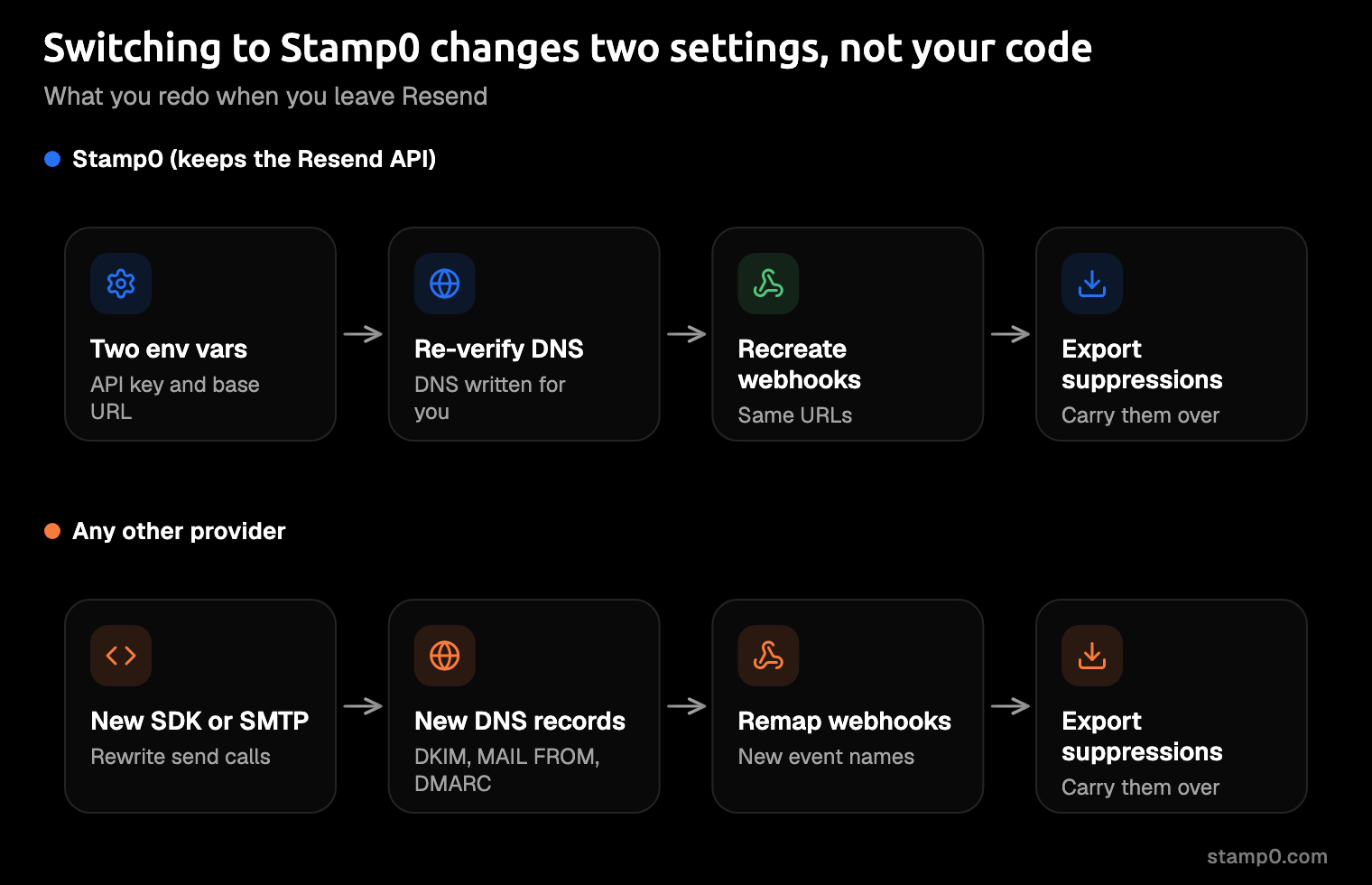
The migration guide walks through each step for Stamp0, in order.
FAQ
What's cheaper than Resend?
At a million emails a month, SES direct and Stamp0 plus SES cost far less than Resend's $650: $100 and $115 on à la carte, or $160 and $175 on Essentials. Hosted useSend comes next at $400. Below 100k the gap narrows, but the SES-based options still lead.
Is there a free Resend alternative?
Stamp0 Free covers up to 50,000 emails a month, so your only bill is the one from AWS: $5 at 50,000 on à la carte, or $8 on Essentials. Resend Free covers 3,000 a month, capped at 100 a day, and hosted Plunk includes 1,000 a month free. Self-hosted useSend and Plunk charge no license fee; you pay for the server and the sending.
Is there a Resend alternative in the EU?
When Stamp0 sends through your AWS account, SES sends and receives mail in your account's region, and its receiving regions include eu-west-1 and eu-central-1. Bodies, attachments and raw inbound sit in your own S3 bucket. Stamp0 itself keeps send metadata (ids, recipients, subject, status, tags and events) and, for marketing, your contacts and templates. Mailgun offers US or EU sending from one account.
Which alternatives came up on r/webdev?
One r/webdev thread from April 2026, asking for a quick Mailgun replacement, named Resend, Postmark, Amazon SES, SendGrid, ZeptoMail, Brevo, Lettermint and pingram. Ask Reddit for an email provider and you get eight names and no invoices; the bills for half of them are in the table above.
Try it beside Resend
The lowest-risk test is to run Stamp0 next to Resend on one domain and compare a month of bills. Free covers 50,000 emails, so the test costs you only what AWS charges to send. Start with Migrate from Resend: two settings, one domain check, and your webhooks back at the same URLs.
If the numbers don't move you, you've spent an afternoon and gained a very precise opinion about your email bill.