The Resend invoice was easy to ignore while it was small. Then volume grew, and at a million emails a month it says $650. Someone mentions Amazon SES is far cheaper, and someone else says you'd have to rewrite your email code to get there.
You can migrate from Resend without the rewrite. We make Stamp0, which publishes this blog. It serves the Resend API, and SES in your own AWS account sends the mail, so the Resend SDK stays and only the API key and base URL change.
The grep -r resend you were dreading can stay in your shell history.
Is it worth moving? The bill at your volume
Below 3,000 emails a month, stay where you are: Resend Free costs $0 and Stamp0 plus SES costs AWS's cents. Call it a tie, unless a busy day needs more than the 100 a day Resend Free allows. Above that, the gap opens quickly.
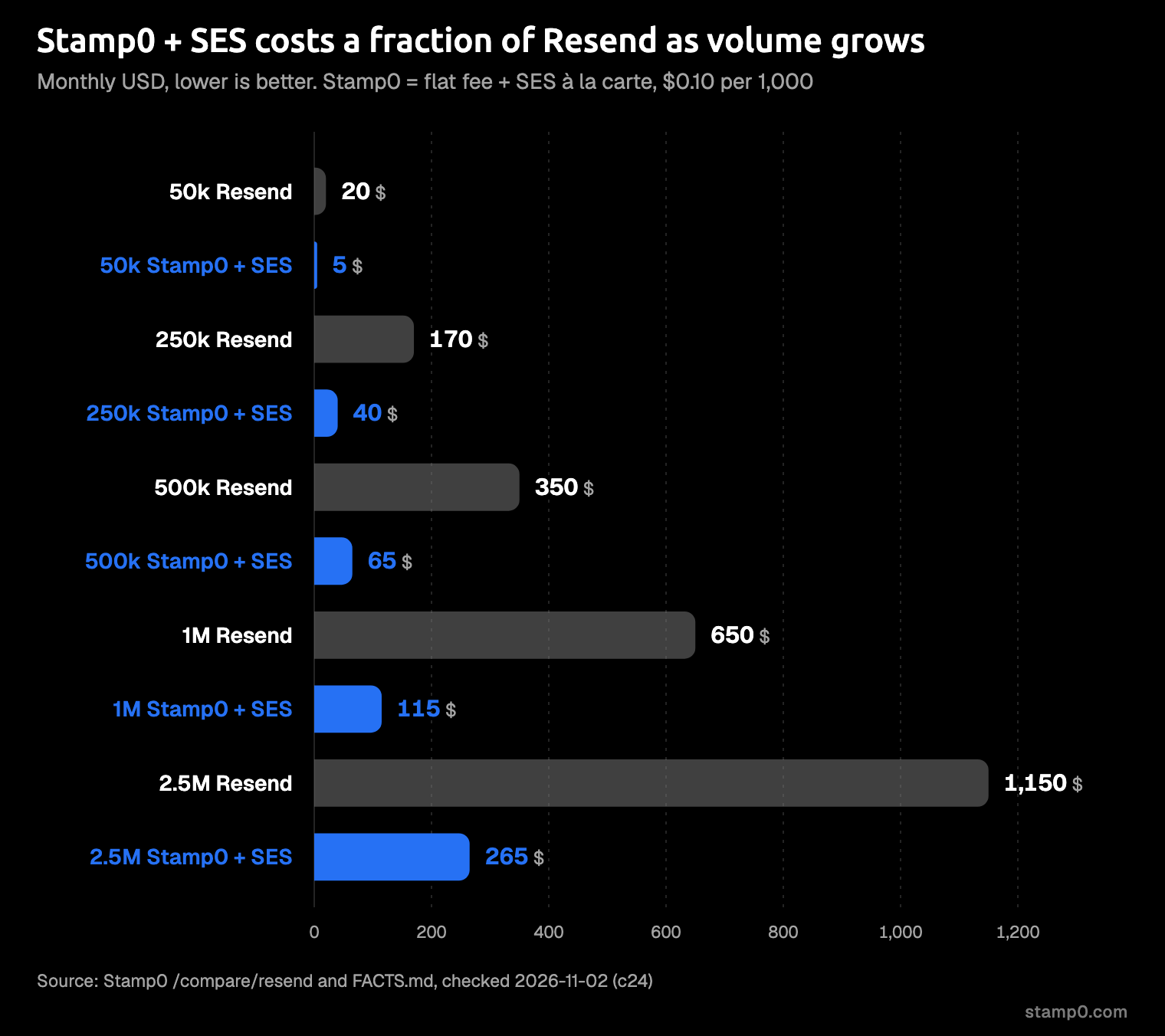
Stamp0 is flat per workspace and never charges per email: Free up to 50,000 emails a month, Pro $15, Scale $49. You pay AWS $0.10 per thousand emails on SES's à la carte plan, and Stamp0's flat $0 to $49 comes on top. So a million emails is $15 to Stamp0 plus $100 to AWS.
Monthly prices as of 2026-11-02, against Resend's cheapest plan at each volume. Resend lists no plan at 250k, so that row is Pro's $35 plus overage at $0.90 per thousand; the other rows are list prices.
| Emails a month | Resend, cheapest plan | Stamp0 + SES (à la carte) |
|---|---|---|
| 50k | $20 | $5 |
| 100k | $35 | $25 |
| 250k | $170 | $40 |
| 500k | $350 | $65 |
| 1M | $650 | $115 |
| 2.5M | $1,150 | $265 |
Now the line on the AWS bill nobody budgets for. Since 2026-07-21, new SES accounts start on a plan called Essentials, at $0.16 per thousand instead of $0.10. At 250k emails that makes Stamp0 plus SES $55 a month instead of $40, still far under Resend's $170. At a million, on Essentials it's $175.
Switch the SES plan to à la carte before your first send, not after your first bill. You do it in the SES console, in each region you use, and the first switch away from a default Essentials plan takes effect immediately. SES pricing plans: what changed in July 2026 explains the plans, pricing runs your own volume, and Stamp0 vs Resend puts the totals next to a feature grid.
Before you start: what doesn't carry over
Stamp0 serves Resend's paths, payloads and errors, with gaps. Here they are before you connect anything, so if one blocks you, you find out now and not halfway through.
- No SMTP. Resend has an SMTP endpoint; Stamp0 is HTTPS only, through a Resend SDK or curl. An app that only speaks SMTP should stay on Resend or SES for now.
- Automations. Resend's automation format isn't translated, and
/automations/:id/runs,/stopand/duplicatereturn 404. Stamp0 serves/automationsas its own Sequences, in Stamp0's shapes (how the marketing paths map). - Event definitions. Resend's event definitions, the custom events its automations trigger on, aren't served.
- Contact, topic and suppression webhooks. You can list these events on an endpoint, but nothing is sent to them. Unsubscribes arrive instead as Stamp0's own
contact.unsubscribedevent, and Resend has no such event, so your existing handlers won't know it. - Logs. Only the latest webhook delivery attempt is kept, and log bodies come back null. The bodies themselves sit in your own S3 bucket.
- The
reactfield. The API doesn't accept it, but the Node SDK renders it to HTML first when@react-email/renderis installed, so React Email code keeps working. - Prefixed IDs. Email IDs look like
em_…, not a bare UUID. If a database column was typed as a UUID because that's all Resend ever sent, it'll tell you on the first insert. - Small differences. Stamp0's DNS list includes a DMARC record,
email.sentfires once per email without a recipient field, and a few error status codes differ. The migration doc lists each one.
Stamp0 has no import tool for Resend history, contacts or templates. Resend keeps logs for 30 days, so export what you want to keep before you start. Export the suppression list too, and add it in Stamp0 with POST /suppressions. Skip that, and an address that bounced on Resend can get mailed again.
On SDKs: Stamp0 is verified against the Node SDK at resend@6.32.0; as of 2026-11-02, npm's latest is 6.37.0. Other Resend SDKs should work, untested by us. On a newer SDK release, run your staging suite against Stamp0 first, or pin the version you've tested.
If your app leans on Resend automations, move transactional mail first and rebuild the sequences afterward. The receipts and password resets are the part that can't wait.
Step by step
Resend keeps sending the whole time. Your app doesn't know Stamp0 exists until you change its settings.
1. Connect your AWS account
Stamp0 connects through one CloudFormation Quick Create stack. It creates a cross-account IAM role with an external ID, an SES configuration set, an EventBridge destination for events, and an S3 bucket for message content. That's the whole footprint: about $0.40 a month in AWS charges, and no Lambda to babysit. The docs say it usually finishes in one to two minutes. Connect AWS has the details.
New account? SES starts it in the sandbox: verified recipients only, 200 messages per 24 hours, 1 per second, per region. Production access is the slowest part of the whole move, and step 2 ends with the request.
One alternative if the app sends only transactional mail: Stamp0 can route it through Cloudflare Email Service in your Cloudflare account instead, with no SES sandbox to wait out. It needs Workers Paid ($5 a month), Cloudflare sets a daily quota it doesn't publish, and Stamp0 caps it at 2 sends a second.
2. Verify your domain again
SES signs your mail now, so the domain needs its own DKIM records alongside Resend's. Leave Resend's records exactly where they are until traffic has moved.
Stamp0 asks for up to six records: three DKIM CNAMEs, an MX and an SPF TXT on the MAIL FROM subdomain (the address bounces go back to), and a DMARC TXT on _dmarc. The DMARC record is only published when the domain has no DMARC policy yet, so a domain that already has one keeps it.
Make one choice before you add the domain. Resend's default Return-Path subdomain is send., and Stamp0's MAIL FROM records default to send. too. While the domain is still live on Resend, give Stamp0 a different subdomain with custom_return_path. Pick bounce: Stamp0's Route 53 automation works on send. or bounce. only, so bounce keeps the automation and gives each provider its own subdomain. Set it when you add the domain; through the API, it's a field in the POST /domains body:
{ "name": "example.com", "custom_return_path": "bounce" }With bounce, the records look like this; copy the exact values from the Stamp0 dashboard:
Type   Name                              Value
CNAME  (token 1)._domainkey.example.com  from the dashboard
CNAME  (token 2)._domainkey.example.com  from the dashboard
CNAME  (token 3)._domainkey.example.com  from the dashboard
MX     bounce.example.com                from the dashboard
TXT    bounce.example.com                SPF, from the dashboard
TXT    _dmarc.example.com                v=DMARC1; p=none; (only if you have none)
You might not type any of them. On Route 53 with the stack option, Stamp0 writes them for you and never overwrites a record you already have, apart from adding SPF to an existing TXT set. On Cloudflare DNS, a Cloudflare connection publishes them when you choose Publish on Cloudflare. Anywhere else, you get a copy-paste list.
If SES already holds an identity for the domain that Stamp0 didn't create, perhaps from an old experiment, the request fails with 409 conflict until you delete that identity in SES.
The docs say verification usually completes within minutes. If SES gives up after 72 hours, POST /domains/:id/verify restarts the clock. Domains covers every record.
Domain verified? Then request production access, once per region you send from, under Account dashboard → View Get set up page → Request production access in the SES console. If you use Stamp0's MCP server, its stamp0.sandbox.prepare tool drafts the request for you to submit.
AWS promises an initial response within 96 hours; our connect page says it usually answers within a day. Resend carries your traffic while AWS reads it. How to get out of the Amazon SES sandbox walks through the form.
3. Change two settings
Create a key in Stamp0 under Developers → API keys and pick Sending access. It starts with s0_ and is shown once, so copy it straight into your secrets. Then change two environment variables.
- RESEND_API_KEY=(your Resend key)
+ RESEND_API_KEY=s0_…
+ RESEND_BASE_URL=https://api.stamp0.com
That's the whole code change for the Node SDK. It reads RESEND_BASE_URL from the environment and falls back to https://api.resend.com when it isn't set. Your send calls stay exactly as they are:
import { Resend } from 'resend';

const resend = new Resend(process.env.RESEND_API_KEY);

await resend.emails.send({
  from: 'Acme <hello@example.com>',
  to: 'you@example.com',
  subject: 'Still works',
  html: '<p>Same code, new sender.</p>',
});
Keep the name RESEND_API_KEY so nothing in your code moves. The quickstart calls it STAMP0_API_KEY and passes baseUrl instead; that works too, it just means touching code.
A baseUrl option in the constructor wins over the environment variable. Use the variable anyway. Then rolling back is a config change and a restart, not a code deploy at the worst possible moment.
4. Recreate your webhooks at the same URLs
Webhooks don't move on their own, but your handlers don't change. Create each endpoint again in Developers → Webhooks or with POST /webhooks, pointing at the same URLs you gave Resend; the payloads match.
Each endpoint gets a new whsec_… secret. Put it where your handler reads its signing secret, and resend.webhooks.verify keeps working, because Stamp0 signs with Standard Webhooks (webhook-id, webhook-timestamp and webhook-signature headers).
While both providers post to the same URL, each signs with its own secret, and the verify call checks one secret at a time. Our advice: try one secret, then the other, until Resend is retired.
Your endpoint should answer with a 2xx within 15 seconds. Miss that and Stamp0 keeps knocking: 30 seconds, doubling up to 6 hours, 11 tries, unless you answer 410, which tells it to stop. Webhooks lists every event.
5. Send a test with curl
Before any app traffic moves, send one email by hand to an address you control. In the sandbox, that address has to be a verified recipient.
curl -X POST https://api.stamp0.com/emails \
  -H "Authorization: Bearer $RESEND_API_KEY" \
  -H "Content-Type: application/json" \
  -H "Idempotency-Key: first-send-check" \
  -d '{
    "from": "Acme <hello@example.com>",
    "to": "you@example.com",
    "subject": "First send through Stamp0",
    "html": "<p>Hello from SES.</p>"
  }'
The from domain has to be the one you just verified, and a good response is just an ID.
{ "id": "em_…" }Then open Emails → Activity and watch the status go from queued to sent to delivered. The send email reference has every field.
The Idempotency-Key header is optional. A retry with the same key within 24 hours replays the first response rather than sending again. It's worth adding to your app's retry path as well, for the day a timeout lies to you. Sending covers it and the batch endpoint.
Run both side by side, then cut over
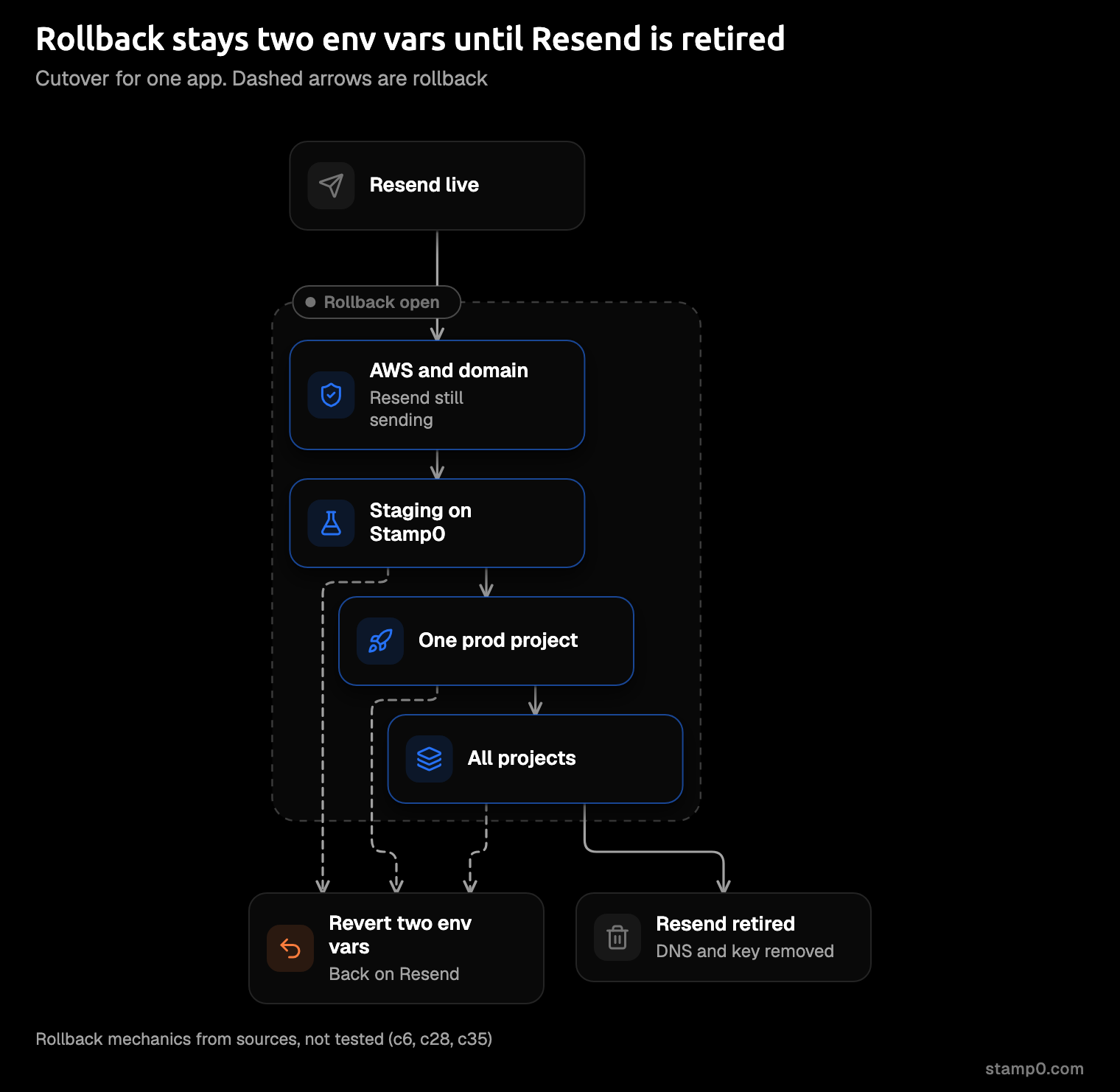
You don't move an app all at once. You move one project or environment at a time by changing its env vars, and Resend keeps serving everything you haven't moved.
- Move staging first. Run your usual flows: signup, password reset, receipts.
- Move one low-risk production project. Watch its bounces and complaints in Stamp0 for a few days before the next one.
- Move the rest, one project at a time.
- Retire Resend after the last project: remove its DNS records, its webhook endpoints and its key.
Stamp0 Free covers 2 projects and 3 domains; Pro has 10 projects and unlimited domains.
Not every suppression covers your whole organization. A hard bounce or complaint reported on one project blocks that address on every connection in your organization. Suppressions you add by hand, like the Resend list you exported, apply only to the connections that project sends through.
The cutover should be boring on purpose. If it isn't, revert the settings, look, and only then move the next project. Pick a Tuesday: the Friday deploy has enough enemies already.
How to roll back
Until you delete Resend's DNS records and key, rolling back is reverting the two settings and restarting. The Node SDK reads them when the client is constructed, so a restart picks up the old values. Resend's records never left, so its mail signs and bounces as it did yesterday.
Keep Resend's webhook endpoints until the last project has moved, for the same reason.
The cheapest insurance in this whole move is not deleting things early.
On the Stamp0 side, deleting the CloudFormation stack revokes Stamp0's access at once and keeps the S3 bucket, so the content you sent stays in your account.
FAQ
Does the Python, Go or Ruby Resend SDK work?
We haven't tested it: Stamp0 is verified against the Node SDK only. For Python, the migration doc names RESEND_API_URL=https://api.stamp0.com as the setting. It names none for Go, Ruby or the rest, so check that your SDK lets you set a base URL, then try it in staging before production.
How long does the move take?
Most of it is minutes: the docs put the stack at one to two minutes and say DNS verification usually completes within minutes. The real wait is AWS reading your production-access request (the end of step 2), not anything you type. An account already in production in the region you send from skips it.
Start the move
Keep Migrate from Resend open for the full map of what goes where, then follow the quickstart to connect AWS and verify your domain. The Resend invoice that started all this becomes the last thing you retire.