The newsletter went out last night. This morning the bounces are in, and they all say 550 5.7.26 from Gmail or 550 5.7.515 from Outlook.com. Your code didn't change. The providers' patience did.
The Gmail bulk sender requirements have applied since February 2024, and since November 2025 Gmail has been ramping up enforcement, including temporary and permanent rejections. The Outlook.com rule for high-volume senders took effect on May 5, 2025. Several top-ranking guides still describe the 2024 announcement, or stop before November 2025.
This post is the current version: one checklist across Gmail, Yahoo and Outlook.com, the rows that apply at your volume, each rejection code with its fix, and the records and headers to paste on Amazon SES.
Stamp0 publishes this blog, and we use Stamp0 as the worked example at the end. Everything before that applies whoever sends your mail, and every rule links to the page Google, Yahoo or Microsoft publishes it on.
The checklist: what Gmail, Yahoo and Outlook.com require
Each provider splits its rules into tiers. Some rows apply to anyone sending to personal accounts, and some only once you count as a bulk sender. The unsubscribe rows apply only to marketing and subscribed mail. Where the provider page says nothing, the cell says "not stated" rather than borrowing a guess from a vendor blog.
| Rule | Gmail | Yahoo | Outlook.com |
|---|---|---|---|
| Who counts as bulk | Close to 5,000 or more to personal Gmail in 24 hours; permanent | No number published | More than 5,000 a day to Outlook.com |
| SPF or DKIM, all senders | Required | Required | Not stated (rules target bulk senders) |
| SPF and DKIM, bulk | Both required | Both required | Both must pass |
| DMARC, bulk | Required; p=none allowed | Valid policy, at least p=none, must pass | At least p=none; p=reject recommended |
| Alignment | From domain aligns with the SPF or DKIM domain | Same; relaxed alignment is fine | SPF or DKIM, preferably both |
| PTR (reverse DNS) | Valid forward and reverse DNS | Valid forward and reverse DNS | Valid reverse DNS |
| TLS | Required | Not stated | Not stated |
| One-click unsubscribe (RFC 8058) | Marketing and subscribed mail; HTTPS URL | Marketing mail; RFC 8058 "highly recommended", mailto accepted | RFC 8058 not named |
| Visible unsubscribe link | In the body | In the body | "Easy to find and use" |
| Honor unsubscribes | Within 2 days (recommended) | Within 2 days | Not stated |
| Spam-rate ceiling | Under 0.3%; aim under 0.10% | Under 0.3% | No figure; points to JMRP |
Sources: the Gmail sender guidelines and bulk sender FAQ, the Yahoo best practices and FAQ, and the Microsoft Policies page. All were checked on November 8, 2026. None of them shows a "last updated" date, so that check date is the best one you'll get.
Build to the Gmail column for authentication, where it asks the most. Yahoo is stricter in two places: it sets no volume threshold, and it requires unsubscribes honored within 2 days, which Gmail only recommends. Microsoft adds two recommendations of its own: p=reject over p=none, and SPF and DKIM both aligned, not just one.
If you send to Gmail "mostly", you're sending to all three: somewhere on your list is a Hotmail address someone opened in college and still checks.
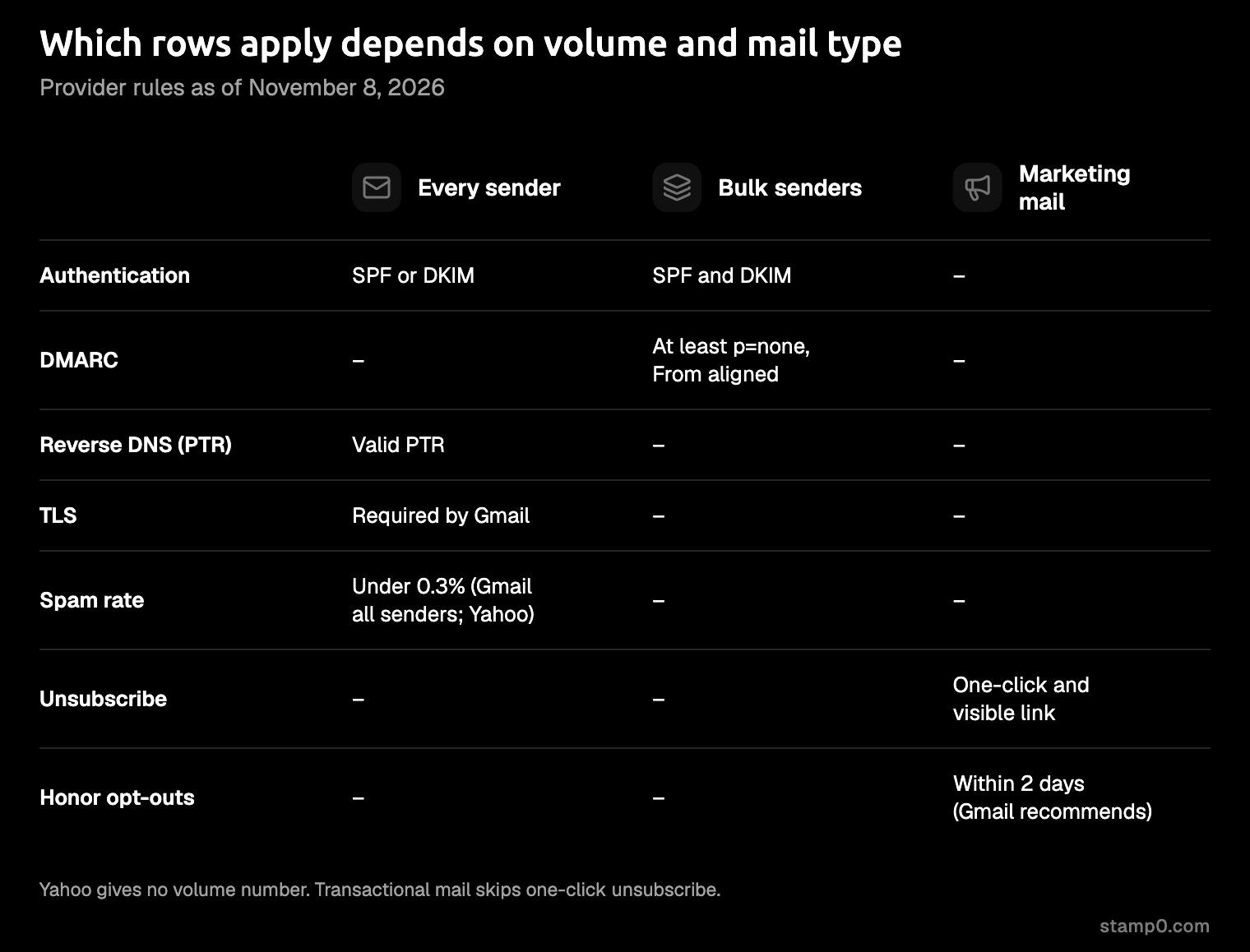
Who counts as a bulk sender
Bulk status is the switch that turns on the stricter rows, and each provider sets it differently.
The Gmail FAQ defines a bulk sender as one that sends "close to 5,000 messages or more to personal Gmail accounts" in 24 hours. Do it once and you're a bulk sender permanently. Mail from all your subdomains counts toward the total for your primary domain, so splitting news. from app. doesn't reset the count.
Business mail sits partly outside it. The guidelines don't apply to messages you send to Google Workspace accounts, though Workspace senders must meet them when they mail personal Gmail.
Yahoo publishes no number at all. Its FAQ says "We will not specify a volume threshold," and the rules cover every domain and consumer brand Yahoo Mail hosts.
Treat the Yahoo bulk rows as yours, because you can't show they aren't.
Outlook.com draws the line at "more than 5,000 emails per day to Outlook.com accounts." Microsoft describes the rule as applying to Outlook.com, its consumer service, which covers Outlook.com, Hotmail, Live.com and MSN addresses.
If you're near any of these lines, plan as if you're over them. Bulk status at Gmail never expires, and one launch-day announcement to your whole list can be all it takes.
Gmail: what changed in November 2025
The Gmail rules took effect in February 2024. What changed in November 2025 is what happens when you miss them.
The FAQ now says it plainly: "Starting November 2025, Gmail is ramping up its enforcement on non-compliant traffic," with disruptions "including temporary and permanent rejections." Enforcement for bulk senders "will be gradual and progressive," so a domain that got away with it last month can start bouncing this month. That text lives on the FAQ, not on the sender guidelines page, so it's easy to miss if you only read the guidelines.
The guidelines hold the fine print. Your DKIM key must be at least 1024 bits, and Google recommends 2048. TLS joined the all-sender list in December 2023. And every message needs basic hygiene: RFC 5322 format, a valid Message-ID, and one address in From.
The spam rate is the row you can't fix in DNS. Google wants the rate Postmaster Tools reports kept below 0.3%, and says to stay under 0.10%. Treat 0.3% as the cliff edge, not the target: at 0.10%, one person in a thousand clicking Report spam is your whole budget.
Postmaster Tools has a Compliance status dashboard that marks each requirement as Compliant, Needs work or No data found. It covers primary domains only, and a change can take up to 7 days to show up.
So after you fix a record, go do something else for those 7 days before you judge it.
Yahoo: the same core, no number
Yahoo asks for the same core as Gmail, minus a number. Every sender needs SPF or DKIM at a minimum, plus valid forward and reverse DNS. A "non-generic" PTR that reflects your domain is recommended, not required, but the FAQ does require a DKIM key of at least 1024 bits, the same floor Gmail sets.
Bulk senders need both SPF and DKIM and a DMARC policy of at least p=none that passes, and relaxed alignment is fine. Yahoo strongly recommends a rua tag too, so DMARC reports reach you.
On unsubscribes, Yahoo wants a working List-Unsubscribe header on marketing and subscribed mail. It calls the RFC 8058 POST method "highly recommended" and accepts mailto. You also need a visible unsubscribe link in the body, and the link alone doesn't count without the header. If an unsubscribe isn't honored within 2 days, Yahoo says it fails the requirement.
The spam ceiling is 0.3% here too, but Yahoo calculates it from mail delivered to the inbox. That's a smaller denominator than everything you sent, so by our reading the rate Yahoo sees can run higher than the one you'd work out from your own totals.
The Yahoo pages still read like 2024 pages. Enforcement began in February 2024 and List-Unsubscribe enforcement in June 2024, and the best-practices page has no TLS rule and no 0.1% target.
Yahoo is the provider that tells you the rules and won't tell you when they apply.
Outlook.com: the May 2025 rule
The Microsoft rule took effect on May 5, 2025, for domains sending more than 5,000 emails a day to Outlook.com accounts. Those domains must pass SPF and DKIM and publish DMARC of at least p=none, aligned with SPF or DKIM and preferably both. Mail servers also need valid reverse DNS, and the Policies page doesn't mention TLS.
Non-compliant mail goes to junk first. If the issues remain, Microsoft says it "may be rejected" with 550 5.7.515. Its announcement, last updated on April 30, 2025, put junk first after May 5 and rejection later, on a date Microsoft would announce. None of the Microsoft pages we opened gives that date.
By our reading, junk is the quieter failure: nothing bounces, so your send log can look perfect while the mail sits unread.
Three Microsoft pages word the DMARC rule three ways. The Policies page says "at least p=none (p=reject is recommended)." The support article on 5.7.515 lists p=reject, p=quarantine or p=none, and the troubleshooting page says p=none or p=reject. All three accept p=none, so the checklist cites the Policies page.
There's no complaint-rate figure. Microsoft points you to its Junk Email Reporting Program (JMRP) and tells you to "actively manage the reputation of your outbound IPs." On unsubscribes, it asks for a mechanism that is "clearly documented and easy for recipients to find and use," without naming RFC 8058.
Reading the rejection codes
A bounce is the rare error message that tells you exactly what's wrong, if you read past the first three digits.
Codes that start with 4 are temporary: the provider defers the message and your server tries again. Codes that start with 5 are permanent. That copy is gone, and resending it unchanged gets the same answer.
| Code | Provider | What it says, in short | Fix |
|---|---|---|---|
550 5.7.26 | Gmail | "The sender is unauthenticated" | Make SPF or DKIM pass for the sending domain |
550 5.7.26 | Gmail | The SPF record of the MAIL FROM (bounce address) domain hard-fails (-all) | Add the servers you send from to that SPF record |
550 5.7.26 | Gmail | Not accepted "due to domain's DMARC policy" | Align SPF or DKIM with the From domain so DMARC passes |
421 4.7.0 | Gmail, temporary | No PTR, very low IP or domain reputation, suspicious content or links, or TLS required | Read the variant: add the PTR, send over TLS, or slow down and fix what hurts reputation |
4.7.23 / 5.7.25 | Gmail | Sending IP has no PTR record | Add a PTR that matches the sending IP |
4.7.27 / 5.7.27 | Gmail | SPF didn't pass | Fix SPF for the MAIL FROM domain |
4.7.29 / 5.7.29 | Gmail | Not sent over TLS | Turn on TLS for outbound mail |
4.7.30 / 5.7.30 | Gmail | DKIM didn't pass | Check the DKIM records and the signing domain |
4.7.31 | Gmail | No DMARC record or policy | Publish a _dmarc TXT; p=none is enough |
4.7.32 | Gmail | From header isn't aligned | Make the SPF or DKIM domain match From |
4.7.28 | Gmail | "Unusual rate of email" | Slow down and spread the send out |
550 5.7.1 | Gmail | Likely unsolicited, low IP reputation, or a malformed message (missing From or Message-ID, duplicate headers) | Fix the format first; reputation takes cleaner lists and time |
550 5.7.515 | Outlook.com | "Sending domain does not meet the required authentication level" | Pass SPF and DKIM and publish aligned DMARC |
553 / 554 | Yahoo | Failed checks against your DMARC or DKIM policy | Fix DKIM and DMARC alignment |
421 / 451 | Yahoo | Temporary deferral | Let it retry, then look at volume and complaints |
In each Gmail pair, the 4.7 code means rate limited and the 5.7 code means blocked. Yahoo gives ranges rather than exact codes, and no code at all for complaint-driven deferrals.
Read past the code to the text, because 550 5.7.26 alone has three variants with three different fixes. The first wants SPF or DKIM to pass. The second means the -all in your own SPF record hard-failed, and the third means DMARC failed under your own policy. The Gmail SMTP error reference, updated October 26, 2026, has the exact wording for each.
Users on the Microsoft Tech Community forum report 5.7.515 both when DKIM was failing and when the records looked right. When your DNS looks fine, open the headers of a real message and read the Authentication-Results line. What you published and the domain that actually signed the mail aren't always the same thing.
The records and headers that satisfy the checklist (on Amazon SES)
On Amazon SES, the authentication rows come down to three sets of DNS records, and the unsubscribe rows to two headers. The records follow the AWS docs, and the headers follow RFC 8058.
DKIM, MAIL FROM and DMARC
; Easy DKIM: three CNAMEs. Copy names and values from the SES console.
<token1>._domainkey.example.com   CNAME  <token1>.dkim.<region>.amazonses.com
<token2>._domainkey.example.com   CNAME  <token2>.dkim.<region>.amazonses.com
<token3>._domainkey.example.com   CNAME  <token3>.dkim.<region>.amazonses.com

; Custom MAIL FROM on a subdomain used for nothing else. Exactly one MX.
send.example.com                  MX     10 feedback-smtp.<region>.amazonses.com
send.example.com                  TXT    "v=spf1 include:amazonses.com ~all"

; DMARC: start at p=none, with an address for reports.
_dmarc.example.com                TXT    "v=DMARC1; p=none; rua=mailto:dmarc-reports@example.com"
Easy DKIM gives you three CNAMEs. Copy them from the SES console, because the tokens and the signing zone vary by region and identity. SES uses a 2048-bit key by default, the length Gmail recommends. Records can take up to 72 hours to propagate, so publish them the day before your send, not the morning of.
The MAIL FROM is the domain SPF checks. By default SES uses a subdomain of amazonses.com, so SPF can't align with your From domain until you set a custom one. Put it on a subdomain of your verified domain that you don't send from or receive on. Publish exactly one MX there, because a second one makes setup fail.
Start DMARC at p=none with a rua address, read the reports, then move to quarantine and later reject. That's the order AWS advises. The AWS example record jumps straight to p=quarantine; on a domain with mail flows you haven't audited, don't copy that part.
An aligned DKIM signature alone gets DMARC to pass. The custom MAIL FROM gets SPF aligned as well, which is the "preferably both" Microsoft asks for.
The one-click unsubscribe header pair
List-Unsubscribe: <https://example.com/unsubscribe/opaquepart>
List-Unsubscribe-Post: List-Unsubscribe=One-Click
Both headers must be covered by your DKIM signature and listed in its h= tag, and List-Unsubscribe must hold one HTTPS URI. When a reader clicks unsubscribe in their mail app, the provider POSTs List-Unsubscribe=One-Click to that URL with no cookies and no authorization. Your server must not answer with a redirect.
So the unsubscribe page that makes people log in first fails twice: the POST carries no session, and the hop to your login page is a redirect.
Gmail requires an HTTPS URL here; a mailto link or a landing page doesn't qualify. Yahoo accepts mailto, but the HTTPS pair satisfies both, so there's no reason to send two kinds. Keep a visible unsubscribe link in the body as well, which Gmail and Yahoo both require on marketing mail.
You can leave all of this off receipts and password resets. Gmail excludes transactional messages from the one-click rule, and Yahoo requires it only on promotional mail.
An unsubscribe link on a password reset mostly invites people to unsubscribe from logging in.
Worked example: the checklist on Stamp0
Most of this checklist is DNS records and headers, which is mechanical work. The part that isn't mechanical is your list.
Stamp0 is a Resend-compatible email API that sends through Amazon SES in your own AWS account, and it takes most of the mechanical part: it writes and checks the authentication records, signs the unsubscribe headers, and tracks your rates. The diagram at the end maps those three groups of rows; PTR and TLS aren't covered there.
It needs an AWS account, and a new SES account starts in the sandbox, sending only to addresses you've verified. Stamp0 drafts the production-access request for AWS to review, and how to get out of the Amazon SES sandbox covers the rest.
Authentication rows. When you add a domain, Stamp0 sets up the three DKIM CNAMEs and a custom MAIL FROM on send. with its MX and SPF TXT. If the domain has no DMARC policy yet, it adds one too: v=DMARC1; p=none;. If your zone is on Route 53 in the connected account and DNS management is on in your stack, Stamp0 writes them for you; with a Cloudflare connection, Publish on Cloudflare does the same. For any other DNS host, you get a copy-paste list. Then it polls until SES verifies them, quickly at first and then hourly. SES stops checking after 72 hours, and POST /domains/:id/verify starts it again. The domains docs walk through each record.
That p=none policy meets the minimum all three providers set, though it isn't the p=reject Microsoft recommends. It carries no rua, so add one if you want the reports Yahoo recommends. If you already publish a policy, Stamp0 never publishes over it, and the move to quarantine and reject happens on your schedule.
Unsubscribe rows. Every Stamp0 marketing email carries List-Unsubscribe and List-Unsubscribe-Post per RFC 8058, DKIM-signed, plus an unsubscribe link and your postal address. A one-click unsubscribe takes effect at once, well inside the 2 days Yahoo requires and Gmail recommends. Each recipient is re-checked right before the send, a campaign won't go out until you've set a physical address, and opted-out or suppressed contacts are never sent to. The marketing compliance docs cover the details.
Rate rows. The dashboard shows your bounce and complaint rates against the SES review thresholds, next to the suppression list for your account and a DNS advisor.
What stays yours. Consent and list quality are yours, and so is the spam rate Gmail counts, which you watch in Postmaster Tools. SES in your AWS account sends the mail, so the reputation it earns is yours too, and it stays with you if you ever leave. Nobody can promise where a given message lands, and we don't. Meeting the checklist means you meet the rules, not that every message reaches the inbox.
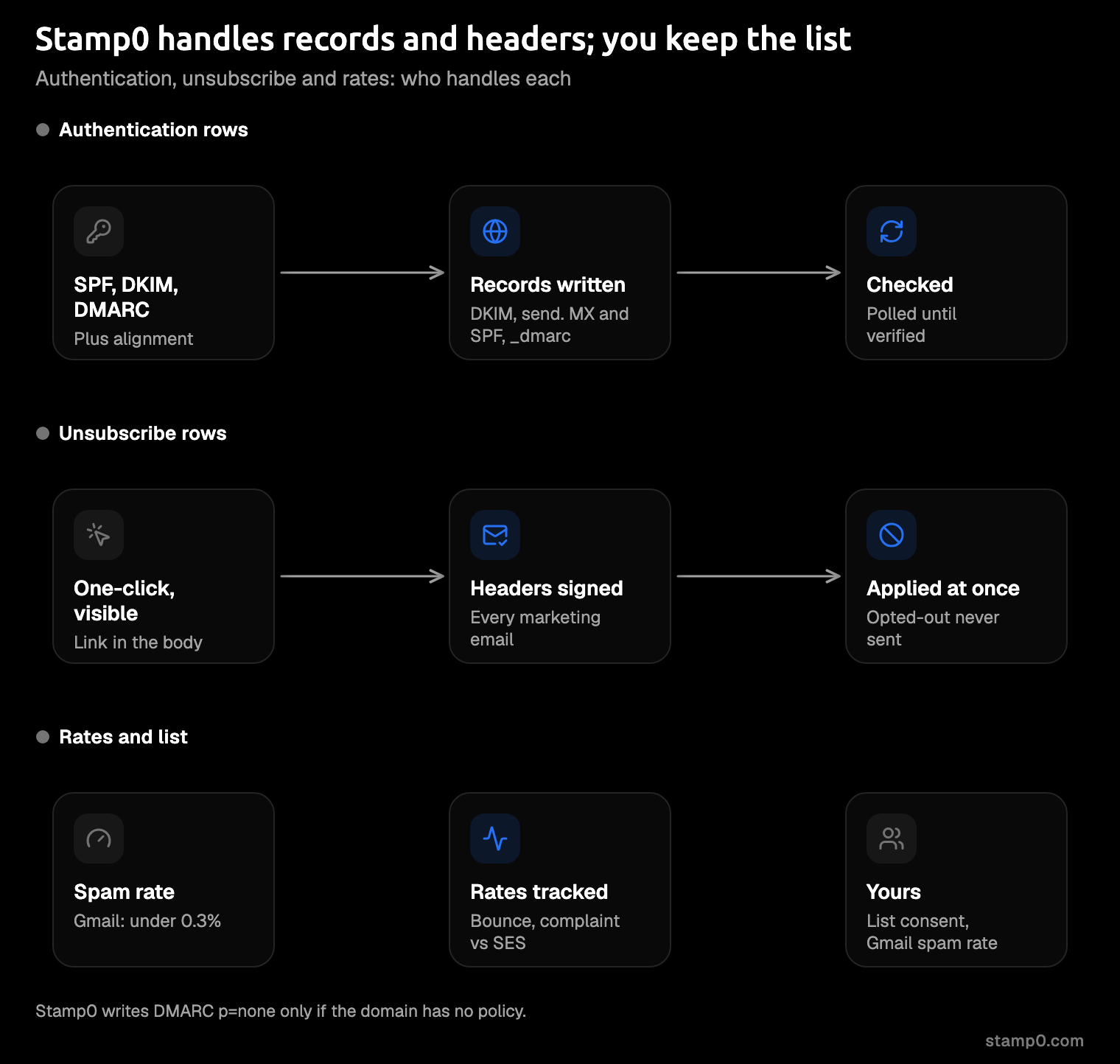
The authentication rows are the ones you can start today: the quickstart connects your AWS account and verifies a domain, and Stamp0 sets up and checks the DKIM and MAIL FROM records for you, plus a DMARC record if you don't have one.
FAQ
Do Gmail's bulk sender rules apply to transactional email?
Mostly, yes. Authentication, PTR, TLS and the spam-rate ceiling apply to everything you send to personal Gmail accounts, receipts included. The one-click unsubscribe requirement doesn't: Gmail excludes transactional messages from it.
What does 550 5.7.515 mean in Outlook.com?
The Microsoft text reads "Access denied, sending domain [SendingDomain] does not meet the required authentication level." In plain terms, a domain sending more than 5,000 emails a day to Outlook.com fails the SPF, DKIM and DMARC requirements. Check a real message's headers to confirm SPF and DKIM both pass and DMARC aligns.
Does Yahoo have a 5,000-a-day threshold?
No. Yahoo won't name one, so plan as if its bulk rows apply; who counts as a bulk sender has the detail.