It's Tuesday afternoon, and the support queue fills with the same ticket: the password reset never arrived. Then the receipts stop.
The notice is in your inbox. Your Resend account is suspended, or sending is paused, and every email your product sends is stuck behind it.
Stop the bad mail at its source, find which flow tripped the line, then appeal with the cause and the fixes you have already made. Keep resets and receipts on a path already in production. Before the next one, put a second sending path behind the same code.
You're not the first: a thread on r/SaaS titled "Resend suspended our entire SaaS email service twice because of malicious signups" drew 34 comments.
The first hour
The order matters: stop the source first and appeal last. Stopping the source and finding the trigger work the same on any provider; the appeal is where providers differ.
An appeal sent while the bot is still signing up describes a problem that's still happening. AWS, for one, asks for changes you have already made, not ones you plan to make.
Stop what's sending
Find every form that emails an address a stranger typed, and shut it or gate it. That means the signup confirmation first, then team invites, "invite a friend", contact forms that send a copy, and anything else that sends on someone's behalf. The notices AWS sends for this kind of abuse name the same features: sign-up forms, contact-us forms, and invite-a-friend.
Closing signup for an hour costs you some signups. Leaving it open can cost you the account.
Pause scheduled marketing sends too. A campaign that goes out mid-review adds volume to the very rates you need to bring down.
While you read the notice, the bot is still filling in the form.
Find the trigger
Read the notice for which number tripped: bounces or complaints. Then match it to a flow. Signup confirmations to made-up addresses bounce; marketing to people who forgot they signed up gets reported as spam.
Your own count will rarely match the provider's. SES, which publishes its method, calculates rates over a "representative volume" rather than a fixed window, so you cannot recompute them from raw counts.
SES counts only hard bounces, the permanent failures, and only on mail to domains you have not verified. It counts only complaints that come back through feedback loops (mailbox providers' spam-button reports), and Gmail sends none.
So your logs and the dashboard will disagree, and both can be right.
On Resend, an address that hard-bounces or complains goes on the suppression list and shows as suppressed, which makes the list a good trail of what went wrong.
Write the appeal
Start with the door your provider gives you. For Resend, that's the help page at resend.com/help. Its Acceptable Use Policy also says that "depending on the severity and your cooperation, we will try to work with you before any disruption."
SendGrid asks you to answer the notification itself, and says contacting Support directly may delay things. Mailgun asks you to contact support once you've fixed the cause.
AWS publishes the one appeal format we found, so borrow its shape.
Keep it to one page with three parts: the root cause, the changes you've already made, and how those changes stop it happening again. That is the structure AWS asks for when you reply to the case SES opens in the AWS Support Center. Attach the evidence: the deployed signup gate, send volume before and after, the cleaned list.
Expect little help with the diagnosis. SES says it usually gives only a high-level overview, and the root cause is yours to find. If AWS declines, the reply says why, and in some cases you can send another request once the issue is resolved.
Resist the urge to write "we will add a CAPTCHA." A plan reads as no fix. Add the CAPTCHA, then write "we added a CAPTCHA."
Keep resets and receipts moving
Only a path already in production helps today. A new SES account starts in the sandbox, a starter mode: verified recipients only, 200 emails a day, and AWS answers the production-access request within 96 hours. A new Cloudflare account starts on a conservative daily quota that Cloudflare does not publish.
Neither is likely to carry your full volume this afternoon.
What helps is a stream you split off earlier. Cloudflare recommends separate domains or subdomains for transactional and marketing mail, so one cannot drag down the other. (Setting up a sending subdomain covers the DNS.)
A subdomain protects reputation, though, not the account. If the whole account is paused, every domain on it stops. A second provider already in production is your path for resets and receipts until the review ends.
A fallback you set up during the outage isn't a fallback. It's a second project, due today.
The numbers providers watch
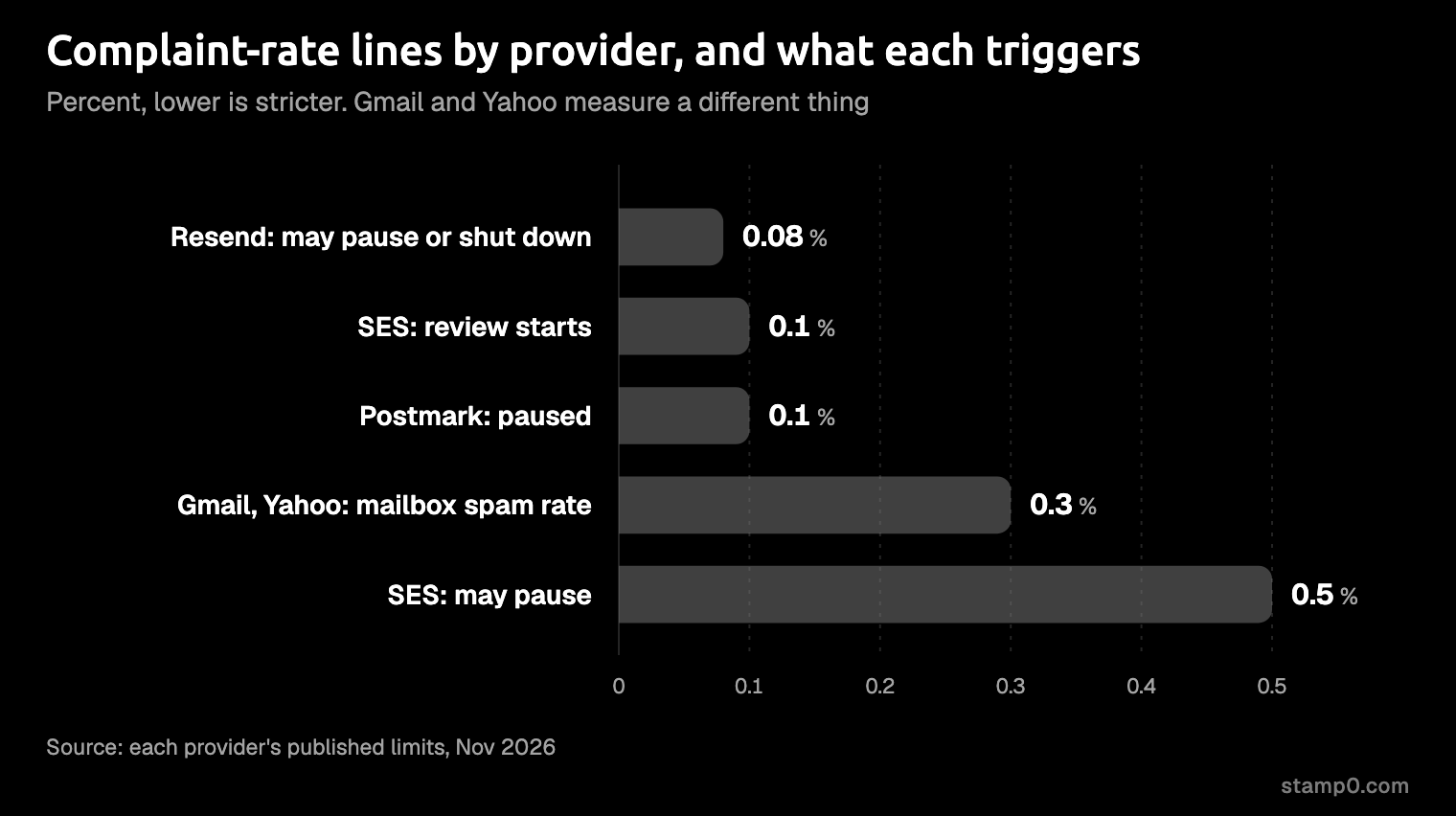
Each provider draws its own bounce and complaint lines, and some keep the numbers to themselves. These are the published lines as of November 2026, taken from the providers' own pages.
| Provider | Bounce line | Complaint line | What happens over it |
|---|---|---|---|
| Resend | Under 4% | Under 0.08% | A temporary pause until the rate falls, or a shutdown without warning |
| Amazon SES, review | 5% or more | 0.1% or more | Account under review; you can keep sending; the notice goes to the AWS account email |
| Amazon SES, pause | 10% or more | 0.5% or more | Sending may be paused until resolved; serious or repeated issues can skip the review |
| Postmark | Under 10% | Under 0.1% | Account contacted and paused, mail held in a queue |
| SendGrid | Not published | Not published | Warned, suspended (mail queued up to 72 hours), deactivated, or banned |
| Mailgun | Not published | Not published | Thresholds exist; the domain is temporarily disabled |
| Gmail and Yahoo (mailbox side) | None | Spam rate under 0.3%; Gmail says aim under 0.10% | Gmail requires it of all senders; Yahoo states the same line |
Read each line with what it triggers. Resend's 0.08% is the lowest complaint number in the table, and over it Resend may pause sending until the rate falls. SES at 0.1% only opens a review you can keep sending through; its pause line is 0.5%. Gmail and Yahoo measure something else, the spam rate at the mailbox, and Gmail requires it under 0.3% from every sender.
In people, that 0.08% is under one complaint per thousand emails: one irritated recipient in a thousand, on a bad Tuesday, and you are over it.
Resend words the consequence differently from page to page. Its quotas page says going over the bounce line "may result in a temporary pause in sending until the bounce rate is reduced." Its Terms of Service let it suspend an account "immediately, without prior notice."
Which applies to you is Resend's call.
Know your provider's line before you need it. The CloudWatch alarm AWS recommends sits at its review level, Reputation.BounceRate at 0.05 and Reputation.ComplaintRate at 0.001, so it tells you the review has started. Set yours at half that, and you hear first.
Rates aren't the only trigger. SES also reviews accounts for spamtrap hits, listbombing, vulnerable sites, and compromised credentials, and in extreme or repeated cases it "might permanently suspend" sending. Spamtrap problems are the slow ones: AWS says fixes can take three weeks or more to evaluate, and it does not say how many traps you hit.
How bot signups become a suspension
A signup form that sends a confirmation email is a sending endpoint anyone on the internet can call. Bots fill it with made-up addresses, or with real addresses that belong to someone else. The made-up ones hard-bounce. The real ones get a confirmation they never asked for, and some of those people click Report spam.
Your rates climb on volume you never chose to send.
AWS has names for both halves. Listbombing is signing a victim's address up to form after form until their inbox drowns, and anti-spam organizations flag forms left open to it. A "vulnerable site" is one whose features, like contact-us and invite-a-friend, let third parties send mail through you.
In the logs it looks like a wall of signups from one IP range in the middle of the night, each with an address nobody will ever read. The signup row is harmless; it just sits in your database.
The confirmation email is the attack surface.
Close the signup form
Three layers on the form, one rule for confirmations, and one list to respect.
Turnstile, verified on the server
Cloudflare Turnstile is a free CAPTCHA alternative. The widget on your page produces a token, and your server has to send that token and your secret key to the Siteverify endpoint, because the widget alone can be bypassed. Tokens expire 300 seconds after they are issued and work once; a replay fails with timeout-or-duplicate. The free plan covers up to 20 widgets with unlimited challenges, and you need not route your traffic through Cloudflare to use it.
// Verify the Turnstile token before you create the account or send anything.
async function passedTurnstile(token: string, ip: string): Promise<boolean> {
  const res = await fetch("https://challenges.cloudflare.com/turnstile/v0/siteverify", {
    method: "POST",
    body: new URLSearchParams({
      secret: process.env.TURNSTILE_SECRET_KEY ?? "",
      response: token,
      remoteip: ip,
    }),
  });
  const outcome = await res.json();
  return outcome.success === true;
}
A widget with no server check is a sticker on the door, not a lock. Cloudflare's server-side validation guide has the full response format.
A honeypot field
Add a field people never see and bots fill in, then drop any request where it has a value. Hide it with CSS and keep it out of the tab order and away from screen readers.
<div class="hp" aria-hidden="true">
  <label>Leave this empty <input name="website" tabindex="-1" autocomplete="off" /></label>
</div>app.post("/signup", async (req, res) => {
// People never see the field, so anything in it came from a bot.
if (req.body.website) return res.redirect("/check-your-email");
if (!(await passedTurnstile(req.body["cf-turnstile-response"], req.ip))) {
return res.status(400).send("Please try again.");
}
// Create a pending account, then send one confirmation email.
});Answer a filled honeypot with the normal success page. A bot that gets an error learns something; a bot that gets a thank-you page moves on.
If your marketing signup forms run on Stamp0, the honeypot and double opt-in are on by default, and Turnstile is a switch you can turn on (signup forms).
Send nothing of value until the address is confirmed
Use double opt-in: the signup stays pending until the person clicks the link in the confirmation email, and nothing else goes to that address before then. AWS recommends it, along with asking for the email address twice on web forms and giving no benefit until the address is verified.
The last part matters most against bots. If an unconfirmed account gets free credits, an API key, or the power to send invites, someone will automate it. The confirmation is still one email to a stranger, which is why the other layers sit in front of it.
Rate limit sends per account and per IP
Cap how many emails any one account or IP address can trigger in a window: confirmations, invites, password resets. Cloudflare WAF rate limiting counts by IP only on the Free and Pro plans; counting by header, cookie, or JSON field needs Enterprise with Advanced Rate Limiting. So the per-account limit belongs in your app, next to the code that sends.
// Fixed-window counters in Redis. Pick the limits from your own traffic.
async function underLimit(key: string, max: number, windowSec: number) {
  const count = await redis.incr(key);
  if (count === 1) await redis.expire(key, windowSec);
  return count <= max;
}

async function sendLimited(accountId: string, ip: string, send: () => Promise<void>) {
  const { maxPerAccount, maxPerIp, windowSec } = limits.confirmations;
  const ok =
    (await underLimit(`mail:acct:${accountId}`, maxPerAccount, windowSec)) &&
    (await underLimit(`mail:ip:${ip}`, maxPerIp, windowSec));
  if (!ok) return log.warn("send limit hit", { accountId, ip }); // drop or queue; don't send
  await send();
}
When a limit trips, log it. A sudden run of tripped limits is your earliest bot alarm, long before any provider dashboard moves.
Respect the suppression list
A suppression list is the record of addresses a provider will not send to again, and it is the cheapest bounce protection there is. SES keeps an account-level list for bounces and complaints, on by default for accounts created after November 25, 2019; it adds only hard bounces and keeps them until you remove them. Cloudflare suppresses an address with no expiry when the mailbox or domain does not exist, soft bounces for 24 hours, and other eligible hard bounces for 7 days.
Never pull an address off the list to "test" it. It bounced once, and it's about to prove it again on your record.
The structural fix: your own reputation and a second path
No provider can promise it won't pause you. You can see the rates coming, own the account your reputation lives in, and keep a second path.
Stamp0 publishes this blog, so read what follows as our worked example.
Reputation in your own AWS account. Stamp0 is a Resend-compatible API in front of Amazon SES, and SES in your AWS account sends the mail. You keep the Resend SDK and change two settings, the API key and the base URL, then verify your domain again and recreate your webhooks.
RESEND_API_KEY=your_stamp0_api_key
RESEND_BASE_URL=https://api.stamp0.com
Compatibility is verified with the Resend Node SDK, the other Resend SDKs are untested, and Migrate from Resend lists the gaps you might hit.
Because SES runs in your account, the reputation, suppression list, and quotas are yours, and they stay put if you ever leave Stamp0.
On Pro, at $15 a month per workspace, the dashboard shows your bounce and complaint rates against the SES review thresholds, next to the suppression list. You watch the line approach instead of reading about it in a notice. Deliverability alerts are there too.
On Free, the stamp0.deliverability.diagnose tool on the MCP server checks recent bounce and complaint rates against your provider's thresholds and ranks the fixes. And the bounced and complained webhook events let you wire your own alarm.
SES can pause you too. Moving to SES does not make you unsuspendable: it reviews accounts at the published lines and can pause, or in extreme cases permanently suspend, sending. Stamp0 cannot lift an SES pause; that case is between you and AWS. What changes is that the process is published and the rates are in front of you.
Watch for a pause in code as well. SES emits no EventBridge event for an account-level pause, and SendingEnabled does not reflect enforcement, so poll GetAccount and read EnforcementStatus.
import { SESv2Client, GetAccountCommand } from "@aws-sdk/client-sesv2";

const ses = new SESv2Client({ region: process.env.AWS_REGION });

// Run on a schedule. Page someone whenever the status changes.
export async function checkSesEnforcement(lastSeen?: string) {
  const { EnforcementStatus } = await ses.send(new GetAccountCommand({}));
  if (EnforcementStatus !== lastSeen) {
    await pageOnCall(`SES enforcement status is now ${EnforcementStatus}`);
  }
  return EnforcementStatus;
}
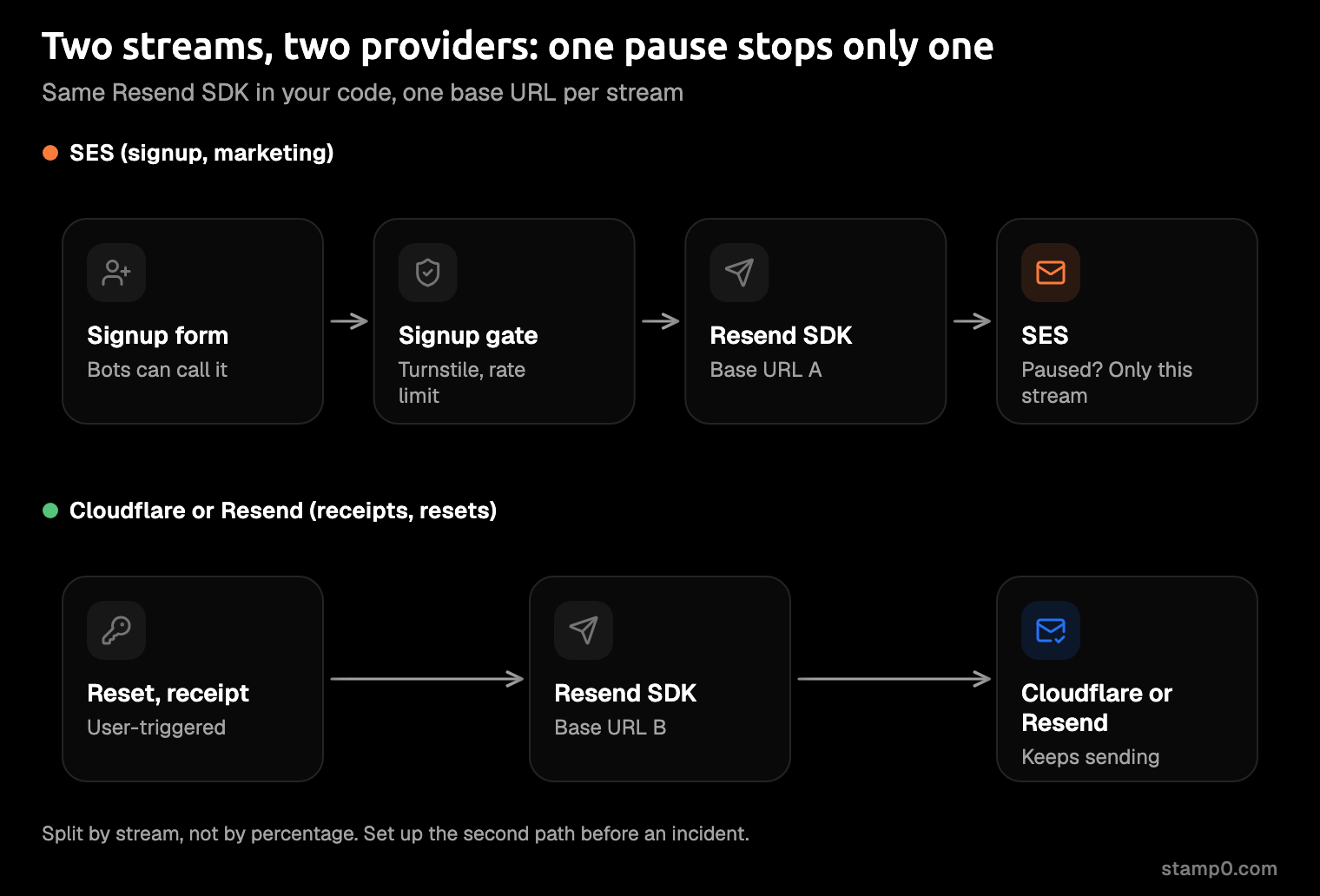
A second path for receipts and resets. In Stamp0 the provider is a per-domain choice, so a transactional subdomain can send through Cloudflare Email Service in your own Cloudflare account while signup and marketing mail go through SES. Cloudflare allows transactional mail only, and if it sees bulk mail it can disable sending for the whole Cloudflare account, which Stamp0 cannot lift (provider terms). It needs Workers Paid at $5 a month and the zone on Cloudflare DNS, and Stamp0's own cap is 2 sends a second per connection and 5 MiB per message (connect Cloudflare).
That's the right shape for resets and receipts, and the wrong one for a newsletter.
Or keep Resend for one stream. The service that sends receipts keeps its Resend key; the service that sends signup and marketing mail gets the two Stamp0 settings. Same SDK, two accounts.
Split by stream, not by percentage. Sending a slice of everything through each path means both carry the bot's confirmations. Splitting by stream means a pause on the signup side leaves the receipts running.
The weak spot: the sandbox. The SES side will not rescue you mid-incident, because a new account starts in the sandbox the first hour covered. Stamp0 drafts the production-access request for you to review and submit; it never submits it for you. Do it this week, while nothing is on fire (getting out of the SES sandbox).
On cost, Stamp0 Free covers up to 50,000 emails a month with the MCP server and CLI, and Pro adds the dashboard rates view. You pay AWS for sending at $0.10 per 1,000 on the SES à la carte plan; new AWS accounts start on Essentials at $0.16 until you switch in the console (SES pricing plans).
The payoff is a quiet one. On the day the signup stream is paused, today's receipts still go out.
FAQ
Will moving to Amazon SES stop suspensions?
No: SES reviews and pauses accounts too, as the structural fix covers, but you gain a published process, visible rates, and an account of your own.
How long does a review take?
The provider pages cited here give no timeline for a rate review. The one duration AWS does give is for spamtraps: fixes can take three weeks or more to evaluate. Plan as if it won't be today, and keep critical mail on a path outside the review.
Can I keep using Resend and add a fallback?
Yes. Leave one stream on Resend and point another at Stamp0 by changing the API key and base URL in the service that sends it; the Resend SDK stays. Set it up before you need it.
Start with one stream: Migrate from Resend walks through the two settings, the domain, and the webhooks, and you can run it beside Resend while you move traffic.