You search "email mcp server" because you want Claude Code to send a receipt from your product's domain. You get directory pages, a guide or two, and a long tail of Gmail readers. Connect the wrong one and you learn, mid-test, that its send tool mails as you, immediately.
There are three kinds of email MCP server. This post lines up the main ones on what each can send, receive, and set up, and on what a misfire can reach. For product email, our pick is Stamp0. We make it, and Stamp0 publishes this blog, so weigh the case with that in mind. It's one remote server that sets up your domain in a single call and reads and answers inbox threads. Its OAuth sessions can't delete anything, and its tools that mail an audience need a confirm: true flag the agent sets.
If all you want is an agent in your personal Gmail, the mailbox section near the end is yours; it's a different job with different risks.
The short answer: which email MCP server for which job
- Stamp0: product email on your own domain, with task tools that do whole jobs, OAuth sessions that can't delete, and a configuration audit log. Ours.
- Resend: if you already send with Resend and want a local server next to the hosted one.
- AgentMail: an agent that needs an inbox of its own, not your product's.
- MailerSend: hosted OAuth with domain management and DMARC and blocklist checks.
- Postmark: local, with delivery diagnostics on a Postmark server.
- Mailgun: local, with no delete operations at all, by design.
- Mailtrap: local, for sandbox testing with spam and HTML analysis.
- Your own Gmail: the Gmail MCP from Google, which reads and drafts but has no send tool.
- SendGrid: we found no official server that sends.
Pick by whose identity the agent uses, then by what it's allowed to break; feature lists come a distant third, and they change while you read.
Three kinds of email MCP server
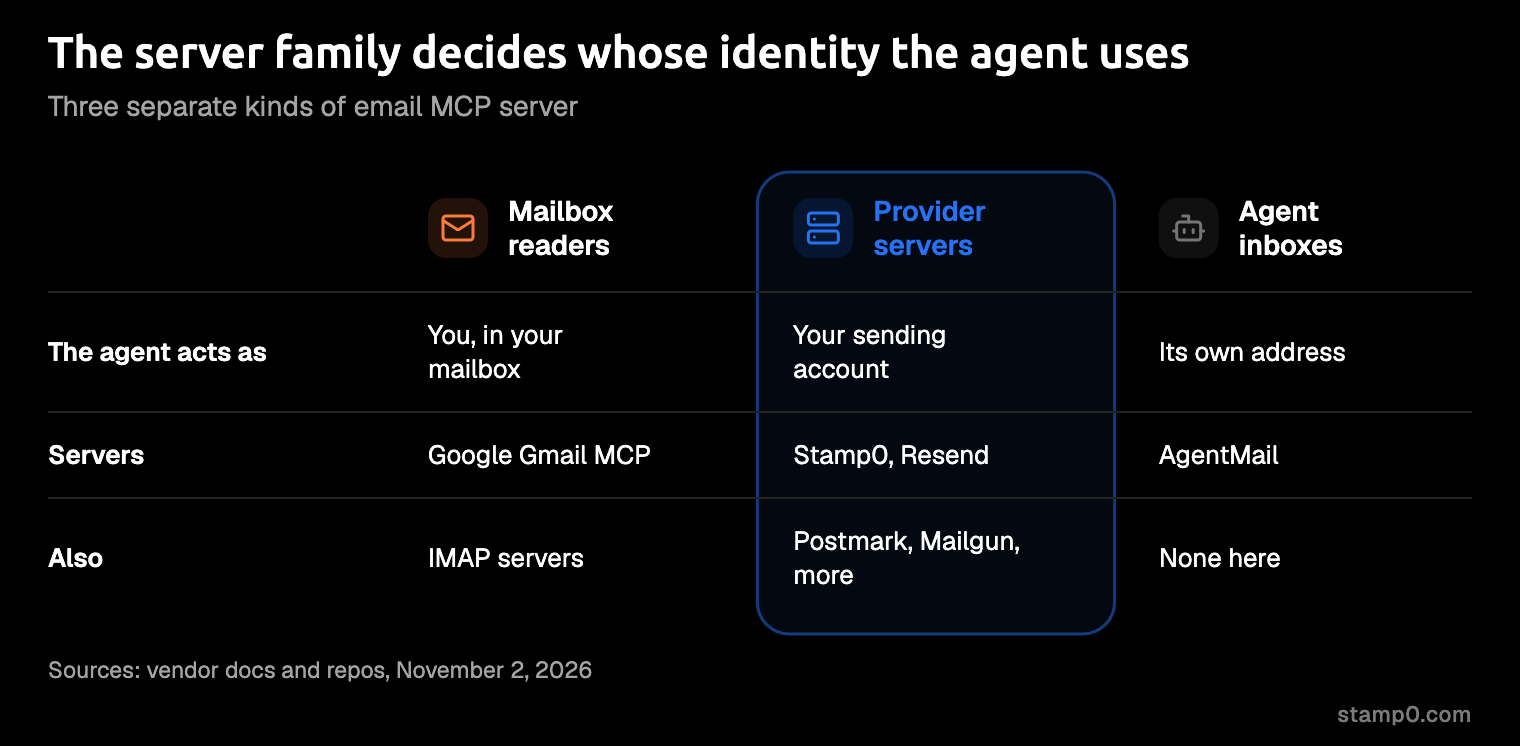
Every email MCP server hands your agent somebody's identity. Whose it is decides the risk before any feature does.
Mailbox readers act as a person. The Gmail MCP from Google and the IMAP servers sign in to a mailbox, usually yours, and read, label, draft, or send from it.
Provider servers act as your sending account. Stamp0, Resend, Postmark, Mailgun, MailerSend, and Mailtrap call a sending API with your key or an OAuth session, and mail goes out from your product's domain.
Agent-inbox servers give the agent its own address. AgentMail is the example here: the agent gets inboxes to send from and receive into.
A mailbox server is the riskiest kind to hand an agent, because it is you.
Picture it answering your accountant from your personal address, in a tone you'd never use, on a Sunday.
Provider servers are usually narrower than a mailbox: they reach your product's domain and the people your product already emails. Narrower isn't harmless, though, because a provider server can still mail your whole audience if you let it.
How we compared
We read each vendor's MCP docs or repo on November 2, 2026, Resend aside, and took every capability from there. Tool counts appear only where a vendor states one in what we read, so MailerSend and Mailtrap get none. Resend's entry, checked on November 1, covers how its servers run and sign in, plus Inboxes; its own docs carry the tool list and the rest. "Not documented" means the page we read doesn't say, not that the feature is missing; "Not checked" means we didn't look.
We make Stamp0, so it's the one server here we describe from the inside, using our own MCP docs. We didn't install or run any of these servers for this post, ours included, so you won't find timings or hands-on scores.
Mailtrap's own roundup was written as of mid-May 2026, and its tool counts for AgentMail and Postmark already trail the vendors' own docs. A tool count in a roundup has the shelf life of a sprint.
Email MCP servers compared
From each vendor's docs or repo as of November 2, 2026 (Resend's as of November 1), and our own docs for Stamp0.
| Server | Hosted or local | Auth | Tool count (vendor) | License | Send | Receive | Domains and DNS | Deliverability tools | Destructive marking | Audit log |
|---|---|---|---|---|---|---|---|---|---|---|
| Stamp0 | Hosted (remote only) | OAuth 2.1 or API key | 65 | Not open source | Yes | Inbox threads and replies | One-call setup; written on Route 53, published to Cloudflare DNS on request, or a copy-paste list | SES-threshold rates (AWS domains), ranked fixes | Yes; audience and irreversible tools refuse without confirm: true | Configuration changes only |
| Resend | Hosted and local (resend-mcp) | OAuth (hosted) | See Resend docs | See Resend docs | See Resend docs | Inboxes; see Resend docs for MCP tools | See Resend docs | See Resend docs | See Resend docs | See Resend docs |
| AgentMail | Hosted, plus stdio bridges | OAuth or x-api-key | 47 + 2 org tools | MIT | Yes; reply, forward, scheduled drafts | Yes, its own inboxes | Not documented | Not documented | Not documented | Not documented |
| MailerSend | Hosted | OAuth | Not stated | Not documented | Yes; bulk and SMS too | Inbound routes (rules) | Add, verify, delete; DNS records | DMARC, blocklist, SPF/DKIM, reputation | Not documented | Not documented |
| Postmark | Local (stdio) | Server token | 24 | MIT | Yes; templates | None listed | None listed | diagnoseDelivery, stats, bounces | Not documented; keep approval prompts on | Not documented |
| Mailgun | Local only | API key | "50+ operations" | Apache-2.0 | Yes | Inbound routes (rules) | List, inspect, verify DNS | Analytics, bounce classification, Optimize, Inspect | No delete operations exposed | Not documented; logs no keys or responses |
| Mailtrap | Local (npx, Docker, .mcpb) | API token and account ID | Not stated | MIT | Yes; batch | Inbound folders, threads, reply, forward | Sending domains, delete included | Stats, logs, sandbox spam and HTML analysis | Not checked | Not checked |
| SendGrid (Twilio Docs MCP) | Hosted | None | Not stated | Not documented | No; docs search and retrieve only | No | No | No | Not applicable | Not applicable |
Read the last two columns first, because they're the ones you'll need on a bad day. When the agent misreads a prompt, they tell you whether it had to ask first and whether anything recorded what it changed.
Every hosted server here that acts on an account offers OAuth sign-in, and what that session may do is the part to read before you click Allow. None of the AgentMail, MailerSend, Postmark, or Mailgun pages we read documents destructive marking or an audit log. Mailgun sidesteps the marking question by exposing no deletes at all.
The email MCP servers, one by one
Stamp0 comes first because it's our pick for product email and our product; the others follow the order of the short answer.
1. Stamp0: best for product email on your own domain
This is our product on our blog, so here's the case with the bias on the table. The MCP server lives at one remote URL, speaks Streamable HTTP, and signs in with OAuth 2.1 or an API key. The OAuth side uses dynamic client registration, so your client needs no app set up in advance. It has 65 tools, has been live since October 22, 2026, and comes with the Free plan. Each domain sends through Amazon SES in your own AWS account, or through Cloudflare Email Service in your Cloudflare account for transactional mail only.
Connect it from Claude Code with one command:
claude mcp add --transport http stamp0 https://mcp.stamp0.com/mcpThen run /mcp in Claude Code to sign in. With several projects in your workspace, pass project_id on a call, or pin one by adding ?project=prj_… to the URL. A headless client skips the sign-in and sends an API key instead. For Claude Desktop, Cursor, VS Code, Windsurf, and Codex, the Stamp0 CLI writes the config for you.
Task tools. Stamp0 adds three tools that each finish a whole job, where an endpoint-per-tool server leaves the sequencing to the model.
stamp0.domains.setupchecks the connection, adds the domain, re-checks DNS, and reports the records still to publish. Those are DKIM (3 CNAMEs), a custom MAIL FROM (the bounce domain: an MX and an SPF TXT onsend.), and DMARC if the domain has none. They're written for you on Route 53, published on request to Cloudflare DNS, or handed back as a copy-paste list for any other DNS host (domains docs).stamp0.deliverability.diagnosereads bounce and complaint rates on your AWS domains against SES review thresholds, along with the suppression list and the DNS advisor, and ranks what to fix.stamp0.sandbox.preparedrafts your SES production-access request and never submits it. New SES accounts start in the sandbox, where they can mail only addresses you've verified, until AWS grants production access (the SES sandbox guide).
"Set up my domain" should be one tool call that reports what's left, not a chain of calls the model has to get in order. And when you ask "why did bounces spike Friday?", you want a ranked list of fixes, not a log dump and a shrug.
Resource and inbox tools. Under the task tools sit the plain ones: emails.send and emails.list for mail, domains.verify and its siblings for domains, and inboxes.threads and inboxes.reply for inboxes. Marketing tools cover contacts, lists, segments, templates, campaigns, sequences, events, and forms, and the MCP docs list them all.
On an AWS domain, received mail lands as raw MIME in your own S3 bucket, threaded, with SPF, DKIM, and DMARC verdicts attached. That's enough for an agent to read a thread and answer it from your domain; the inbound docs have the details.
The safety model. Seven tools are marked destructive because they email an audience or can't be undone: campaigns.send, campaigns.resume, campaigns.cancel, sequences.activate, sequences.enroll, contacts.delete, and lists.remove. The server refuses each one unless the call carries confirm: true. It also tells the agent to show you the content, a test or dry run, and the audience size first, and to set the flag only after you approve. The flag is what the server enforces; the approval depends on the agent following that instruction, so keep your MCP client's approval prompts on for these tools. emails.send and inboxes.reply aren't on the list, so a single message or a reply goes out without the flag. Read-only tools are marked as well, so your client can run them without asking.
The hard limits belong to OAuth sessions, and the server enforces them. An app signed in with OAuth can send and manage domains, inboxes, suppressions, and marketing, but it can't delete anything, create API keys or webhooks, change connections, or touch billing. The server keeps no data of its own: every tool call is an API call made with your credential. Configuration changes are recorded in the organization's audit log; sends and replies aren't audited. The security docs cover the rest.
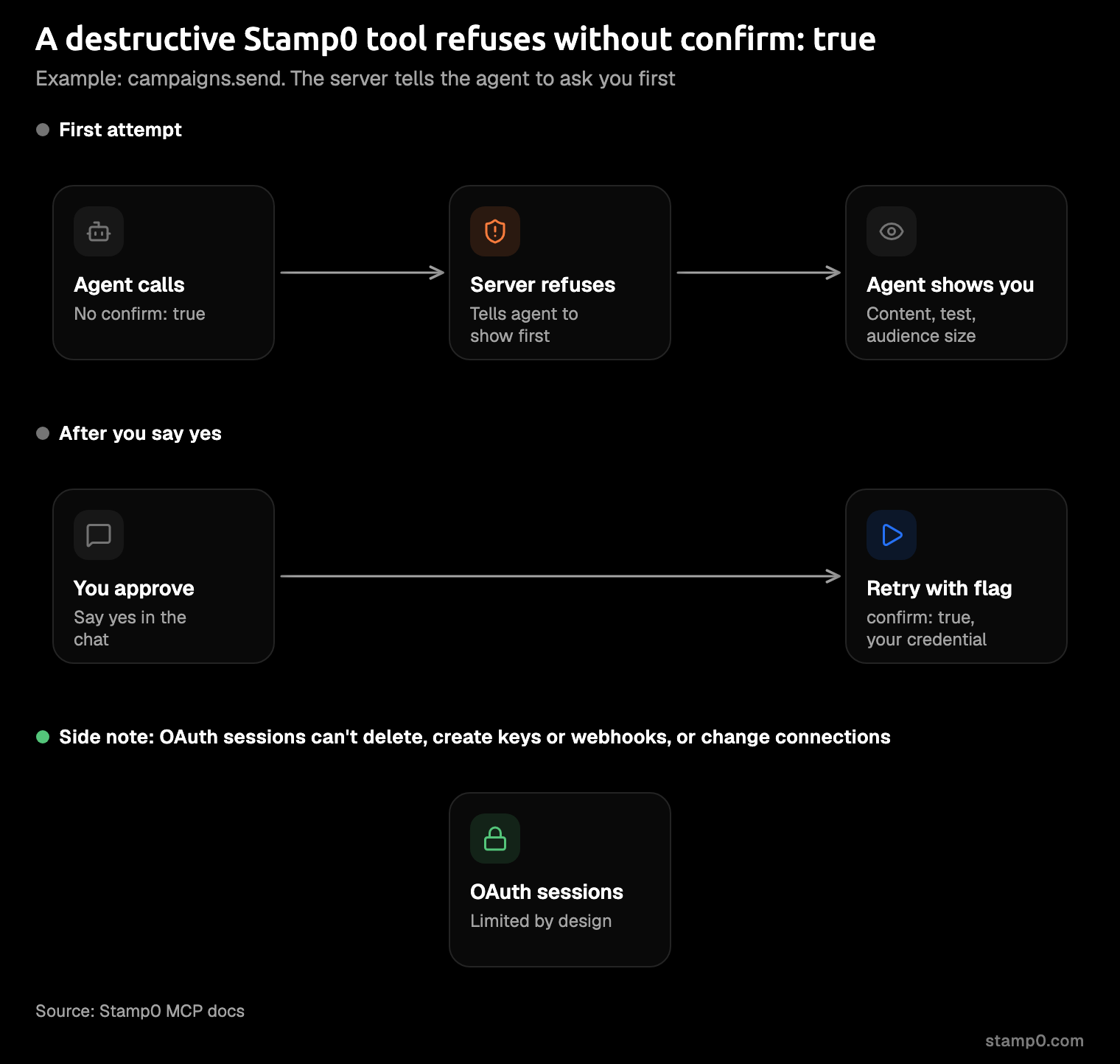
A hijacked agent can type confirm: true as easily as you can. In an OAuth session, it can't type its way past the limits. If your agent runs on an API key instead, check what that key can reach, because the limits above are documented for OAuth sessions.
Where Stamp0 falls short.
- Remote only, no local stdio server. Any client that speaks Streamable HTTP can connect, and headless clients use an API key.
- Not open source, so you can't read the server's code. What our docs state: it keeps no data of its own, every call is an API call with your credential, and an OAuth session's limits hold whatever the agent asks.
- It needs an AWS account (new ones start in the SES sandbox) or a Cloudflare account on Workers Paid.
stamp0.sandbox.preparedrafts the production-access request for you. - Agent keys locked to one inbox are a Pro feature. The MCP server itself comes with Free.
- It isn't for your personal Gmail. The Gmail MCP from Google is built for that.
MCP and the CLI come with every plan, Free included. Pro is $15 and Scale $49 a month per workspace, flat, and you pay AWS directly for the sending (pricing).
Best for: sending and receiving product email on your own domain, with an agent you can let set things up. We built it, so hold the claim up against the table.
2. Resend: best if you already send with Resend
Resend runs a hosted MCP server that signs in with OAuth, plus a local package, resend-mcp, for running it on your own machine. Resend launched Inboxes on October 22, 2026, so if your agent needs to receive mail, check which inbox tools the MCP exposes.
The Resend MCP docs are where to read the rest: the tool list, what a hosted OAuth session may do, and how it treats sends and deletes.
If you already send with Resend and like the API more than the invoice, Stamp0 keeps the Resend API: point the Resend SDK at a Stamp0 key and base URL, verify the domain again, recreate your webhooks, and it sends through SES in your own AWS account. The Node SDK is verified; Resend's other SDKs are untested by us. A few Resend features have gaps, among them parts of automations, event definitions, and some webhook types that are accepted but not delivered. Migrate from Resend lists the gaps, and Stamp0 vs Resend puts the two side by side.
3. AgentMail: best when the agent needs its own address
AgentMail hosts its server at https://mcp.agentmail.to/mcp. It signs in with OAuth through its console or an x-api-key header, and npm and Python stdio bridges cover clients that can't send custom headers. Its MCP docs list 47 tools plus 2 organization-selection tools for OAuth sessions.
The tools center on the agent's own mail: send_message, reply_to_message, forward_message, and drafts with a sendAt time. A message.received event carries metadata only, get_message reads the body, and allow and block lists control who gets through. The MCP page doesn't cover domains and DNS, deliverability tools, tool annotations, or an audit log, and the repo is MIT-licensed.
It's the right shape when the agent is the sender, not your product. A support bot with an address of its own is a different job from your password resets, and AgentMail is built for the first.
4. MailerSend: best for hosted domain health checks
MailerSend hosts its server at https://mcp.mailersend.com/mcp over Streamable HTTP and signs in with OAuth, which in Claude is a login flow. Its MCP page lists tools to send email, bulk email, and SMS. Others manage inbound routes, domains (delete included), DNS records, and suppressions. Inbound routes are the rules that forward received mail; the tools manage those rules, not the messages.
Domain health is its strong suit: DMARC and blocklist monitoring, plus SPF, DKIM, bounce, and reputation checks. MailerSend states no tool count, lists delete_domain, and documents no destructive marking or audit log on that page.
Strong on domain health, then. Give its delete tools an approval prompt in your client, because a deleted sending domain is a long afternoon.
5. Postmark: best for local delivery diagnostics
The official Postmark server is @activecampaign/postmark-mcp, published by ActiveCampaign. It runs locally over stdio, needs Node.js 22 or higher, and is MIT-licensed. The repo lists 24 tools covering sending, templates, bounces, suppressions, diagnoseDelivery, delivery stats, and webhooks. It lists no receive tool and no domain or DNS tool.
You authenticate with a POSTMARK_SERVER_TOKEN in your environment, and the repo is blunt about it: "The token grants full access to that server." So Postmark advises giving the agent a dedicated Postmark server. It also warns that sending and webhook tools can be prompt-injection targets and says to keep approval prompts on.
That advice applies to every server in this post, and Postmark is the vendor that wrote it down. Use a dedicated server, as it says, and this is a solid local pick for diagnosing delivery on an account you already run.
6. Mailgun: best for a local server with no deletes
The official mailgun/mailgun-mcp-server is local only and Apache-2.0; the docs say "Mailgun does not currently offer a hosted version of this server." You set MAILGUN_API_KEY and a US or EU region, and the docs say the key is "never exposed to the AI model." The Mailgun MCP docs describe "50+ operations."
Coverage is broad: sending, retrieving, and resending messages; listing, inspecting, and verifying domain DNS; inbound routes, webhooks, suppressions, analytics, and templates. The repo adds bounce classification, validation, Optimize, and Inspect.
The design choice worth copying fits in one sentence: "The server exposes read and update operations but does not expose any delete operations." The server "does not log API keys, request parameters, or response data," and Mailgun advises a dedicated key "with permissions scoped to only the operations you need."
Of the servers whose docs we read, it's the only one that says it exposes no deletes, and an agent can't delete through a tool that doesn't exist. The trade-off is a key living in your machine's environment.
7. Mailtrap: best for testing before you ship
The official mailtrap/mailtrap-mcp runs locally through npx -y mcp-mailtrap, Docker, or an .mcpb bundle, with no hosted endpoint described, and it's MIT-licensed. It reads a MAILTRAP_API_TOKEN and, for most account tools, a MAILTRAP_ACCOUNT_ID; organization tools need a separate org token.
The repo covers single and batch sends, logs, stats, templates, and a sandbox with spam and HTML analysis. It manages sending domains, delete-sending-domain included, and has a tool that emails DNS setup instructions to whoever runs your DNS. On the receiving side it has inbound folders, inboxes, threads, and reply, reply-all, and forward. The repo states no tool count, and we didn't search it for tool annotations or an audit log, so the table marks both "Not checked."
Reach for it to test templates before they ship; its DNS-instructions email is a kind touch for the teammate who never reads chat.
What about SendGrid?
We found no official SendGrid MCP server that sends. The Twilio Docs MCP at https://mcp.twilio.com/docs is hosted, needs no authentication, and indexes SendGrid docs. It's read-only and not yet generally available, per Twilio, and it "does not execute API calls on your behalf." Mailtrap's roundup lists community SendGrid servers; run the publisher check below before you install one.
It'll tell your agent how the SendGrid API works, and it won't call it.
Mailbox MCP servers: Gmail and IMAP
If you want an agent in your own inbox, not your product's, you're in a different category: these servers sign in as you.
The Gmail MCP from Google lives at https://gmailmcp.googleapis.com/mcp/v1 as a Developer Preview, open through the Workspace Developer Preview Program, with OAuth scopes gmail.readonly and gmail.compose. It has 10 tools that search, read, label, and draft, and none of them sends: a person sends the draft from Gmail. Any Streamable HTTP client with OAuth 2.0 can connect; in Claude.ai and Claude Desktop it's a custom connector on Enterprise, Pro, Max, or Team plans.
Google shipping no send tool makes its tool list the safest default anyone in this post has set. Copy it: a draft costs you a click, and a wrong send costs you an apology.
Community Gmail servers go further. GongRzhe's Gmail-MCP-Server runs locally with OAuth 2.0 through your own Google Cloud project and has 19 tools. They include a send_email that sends immediately, plus delete_email and batch_delete_emails. Its owner archived the repo on March 3, 2026.
IMAP servers reach any mailbox you can log in to. The ai-zerolab mcp-email-server runs locally with uvx under BSD-3-Clause, takes your email and password in a local config UI, and reads, searches, organizes, and sends. boutquin/mcp-server-email is a local Go server with 22 tools. It signs in with an app password or an OAuth2 device flow for Gmail and Outlook, and keeps passwords in plaintext config (it advises chmod 600). Its email_delete and email_batch tools take a permanent flag.
Both are fine for tinkering with your own mail. Neither is how a product should send its mail.
Before you connect one: five checks
The question isn't whether your agent will misfire. It's what the misfire can reach, and these checks answer that for any server in the table.
- Check the publisher. In September 2025, an npm package named
postmark-mcpadded a BCC of every sent email to an attacker in version 1.0.16, with 1,643 downloads reported. Postmark said, "We didn't develop, authorize, or have any involvement with the 'postmark-mcp' npm package." The official package is@activecampaign/postmark-mcp. Install from the link in the vendor's own docs or repo, as each entry above gives, not from a directory listing. - Prefer OAuth with a narrow session over a full key in your environment. Stamp0, the hosted Resend server, AgentMail, and MailerSend all offer OAuth, which keeps keys off your machine. Then find out what that session may do: Stamp0 documents its limits; read the other vendors' docs for theirs. A local token can be broad; Postmark says its token "grants full access to that server."
- Give the agent its own server, key, or inbox. Postmark says use a dedicated server, Mailgun says use a dedicated scoped key, and Stamp0 agent keys reach one inbox, on Pro.
- Keep approval prompts on for send, delete, and webhook tools. It's Postmark's advice, and it holds everywhere. Stamp0's audience and irreversible tools refuse to run without
confirm: true, but the agent sets that flag. Mailgun skips deletes entirely. On every server here, your client's prompt is the brake you hold yourself. - Find out where changes are logged. Stamp0 records configuration changes in the organization's audit log; sends and replies aren't in it. Mailgun states what its server doesn't log: keys, parameters, and responses. The AgentMail, MailerSend, and Postmark pages we read mention no audit log, so ask before you need one.
Nobody sets out to install an impersonator. It just ranks well in a search one afternoon, under a name that looks right.
FAQ
Can Claude Code send email?
Yes, through a provider MCP server. For Stamp0, claude mcp add --transport http stamp0 https://mcp.stamp0.com/mcp adds it and /mcp signs you in. The official Postmark server runs locally with npx -y @activecampaign/postmark-mcp.
Is there an official Gmail MCP server?
Yes, from Google, in Developer Preview: it reads, labels, and drafts, and has no send tool, so you still press the button yourself.
Does SendGrid have an MCP server?
None that sends, as far as we found: the Twilio Docs MCP answers questions from SendGrid docs and doesn't call the API.
Should I use a hosted or local email MCP server?
Hosted with OAuth keeps keys off your machine, and the session can be narrower than a key: Stamp0's OAuth sessions can't delete anything or create keys. Local servers run on your machine with a key in your environment, and that key reaches whatever it reaches on the account.
What's a good Resend MCP alternative?
Stamp0, if you want to keep the Resend API on your own AWS with an MCP server built around task tools; check the migration gaps first. The hosted and local Resend servers are the baseline to compare it with. Stamp0 vs Resend has the rest.
Pick by identity, then by blast radius
Decide whose identity the agent should use, then how far a misfire can reach, and the list gets short fast. For your own inbox, start with the draft-only Gmail server from Google. For an agent with an address of its own, look at AgentMail. For product email on your own domain, connect Stamp0's server and run stamp0.domains.setup on the domain you send from. It tells you what's left to publish, which is the most useful sentence an email setup can say.
Start with the MCP server docs, or let the CLI write your client config.