Nobody reads the Resend invoice while it says $20. Then a launch goes well, volume climbs, and one month the total has three digits. Somewhere in a thread, someone says Amazon SES is a tenth of the price.
The thread is a little generous to SES, and right about the direction. As of 2026-11-02, a million emails a month costs $650 on Resend's cheapest plan and $100 on SES at its à la carte rate. We make Stamp0, which publishes this blog, so here's our third column up front: a Resend-compatible API sending through SES in your own AWS account, for $115. That's Stamp0's flat $15 on top of AWS's $100.
The real question isn't which is cheaper. SES is, at every volume past Resend's free plan. It's what you'd rebuild around SES to use it, and whether skipping that work is worth $550 a month to you at a million emails.
One trap first: new AWS accounts start on a pricier SES plan called Essentials, so the $100 assumes you switch.
What Amazon SES and Resend cost at your volume
Grab last month's send count and find your row. These are monthly list prices as of 2026-11-02, with SES on à la carte.
| Emails a month | Resend, cheapest plan | SES alone (à la carte) | Stamp0 + SES (à la carte) |
|---|---|---|---|
| 50k | $20 (Pro) | $5 | $5 (Stamp0 Free) |
| 100k | $35 (Pro) | $10 | $25 |
| 250k | $170 (Pro plus overage) | $25 | $40 |
| 500k | $350 (Scale) | $50 | $65 |
| 1M | $650 (Scale) | $100 | $115 |
| 2.5M | $1,150 (Scale) | $250 | $265 |
The math is short. SES is your volume divided by 1,000, times $0.10. Stamp0 is $0 up to 50,000 emails on Free, then Pro's flat $15, on top of the AWS bill. Resend is the lowest plan, or plan plus overage, that covers the volume: Pro is $20 for 50k and $35 for 100k, and Scale runs from $350 at 500k to $1,150 at 2.5M.
The 250k row is the odd one. Pro at $35 plus 150,000 emails of overage at $0.90 per 1,000 comes to $170, which beats moving up to Scale. The 100k row is the closest, $25 against $35, and it's where Resend's extras earn their keep most easily.
We left out attachments, dedicated IPs, Virtual Deliverability Manager and the small AWS charge for Stamp0's own stack, priced further down. If your account is still on Essentials, every SES figure here runs higher; the next section has those numbers.
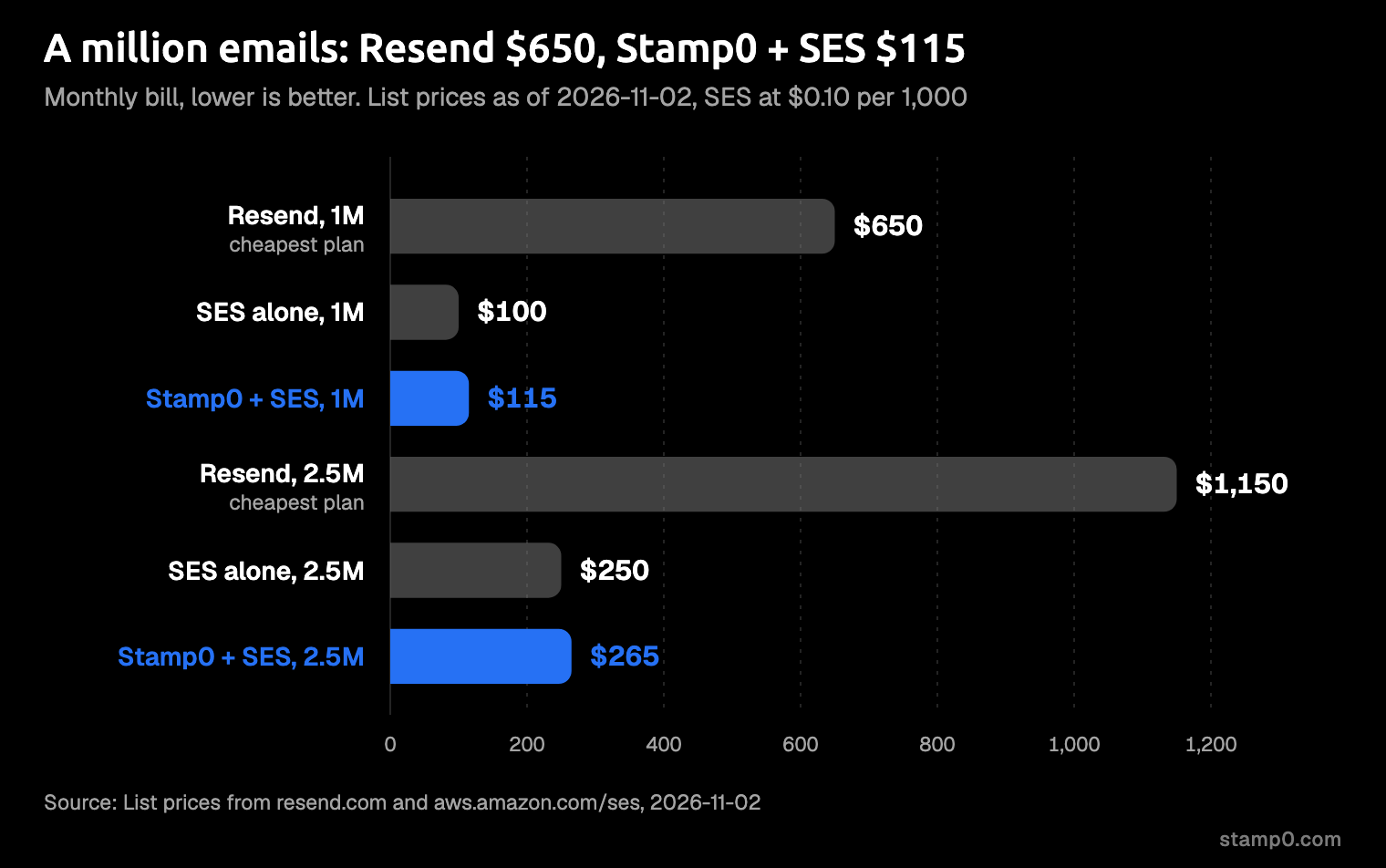
At a million and above, the gap stops being a rounding error and becomes the line someone in finance circles in red. The same totals sit next to a full feature grid on Stamp0 vs Resend.
The SES price you'll actually be billed: Essentials or à la carte
Since 2026-07-21, new SES accounts start on a plan called Essentials, at $0.16 per 1,000 emails instead of $0.10. The same applies to any account and Region with no metered SES activity since 2025-06-01. Essentials bundles Virtual Deliverability Manager insights, Mail Manager processing and an authenticated ingress endpoint, though picking the plan turns none of them on.
As of 2026-11-02, à la carte is still the plain pay-as-you-go rate. At a million emails, SES alone comes to $160 on Essentials against $100 on à la carte, and Stamp0 on top adds its flat $15 to either. On Essentials both SES columns still undercut Resend in every row, though at 100k Stamp0 plus SES narrows to $31 against $35.
Three top-ranking comparisons written since July 2026 don't mention Essentials at all, though a fresh account bills $0.16, not $0.10. Price a new account from one of those pages and the first bill comes in higher, with nothing wrong except a default.
To switch back:
- Open the SES console in a Region you send from.
- Go to the Pricing plan page.
- Choose Cancel plan, which returns the account to à la carte.
- Repeat in every Region you send from, because plans apply per account and per Region.
If Essentials was your default, that first cancel applies immediately rather than at the next billing cycle.
The rest of the plan menu is in Amazon SES pricing explained, and the July change has its own short post: SES pricing plans: what changed in July 2026.
What the difference buys on Resend
A managed email API sells you the absence of infrastructure. Someone else runs the sending, you get a key, and you pay per email for the privilege. Resend is a good one, and its price buys real things:
- SDKs you already know, plus an SMTP endpoint for apps that can't use them.
- Inbound mail on every plan, with 3 inboxes included on every plan, Free too.
- Paid marketing plans priced by contacts, from $40 a month.
- 30 days of retention on every plan.
- A dedicated IP at $30 a month on Scale.
- SOC 2 Type II. Stamp0 is SOC 2 certified.
And there's no AWS account to open, ever. You probably remember your first Resend send: you pasted in a key and had a working email before lunch.
At 50k and 100k, Resend costs $10 to $15 a month more than Stamp0 plus SES, and for plenty of teams that's money well spent. Resend's margin is the price of not running anything yourself. That's a fair trade until the bill grows.
What Amazon SES leaves to you
SES is a sending engine, a very cheap one, and nearly everything around the send is yours to build.
The sandbox. Every new account starts in it, in each Region: you can send only to verified recipients, at most 200 messages per 24 hours and one per second. Getting out takes a production-access request, and AWS Support's first response can take up to 96 hours. Ask the night before a launch and the answer can arrive on day four.
DNS by hand. You add three DKIM CNAME records (they let receivers check your signature) at your DNS host. Then a custom MAIL FROM domain, the address bounces return to, which needs an MX and an SPF record on a subdomain. Then a DMARC record, your policy for mail that fails those checks.
Bounces and complaints. SES doesn't send them anywhere useful until you pick a route: email feedback, an SNS topic, or event publishing to SNS or Firehose through a configuration set (a named group of sending rules you attach to your mail). Skip that and the notices land at the Return-Path address, where bounces come back.
No stored event history, and no webhooks in Resend's format. SES publishes events once you wire them up, but keeping them is your job: to answer "did this email arrive?" you store the events yourself and write the handler that turns them into something your app understands.
Marketing. Campaigns, segments and a welcome series that fires on signup: a second product to build, ship and keep running next to your first one.
SES isn't bare, though. It has its own SMTP interface in each Region, with SMTP credentials separate from your AWS keys.
None of it is hard. All of it is yours to keep running, including on the Friday a bounce spike shows up. The sandbox has its own walkthrough in How to get out of the Amazon SES sandbox, and the console gaps are laid out in Stamp0 vs the Amazon SES console.
The third option: a Resend-compatible API on your own SES
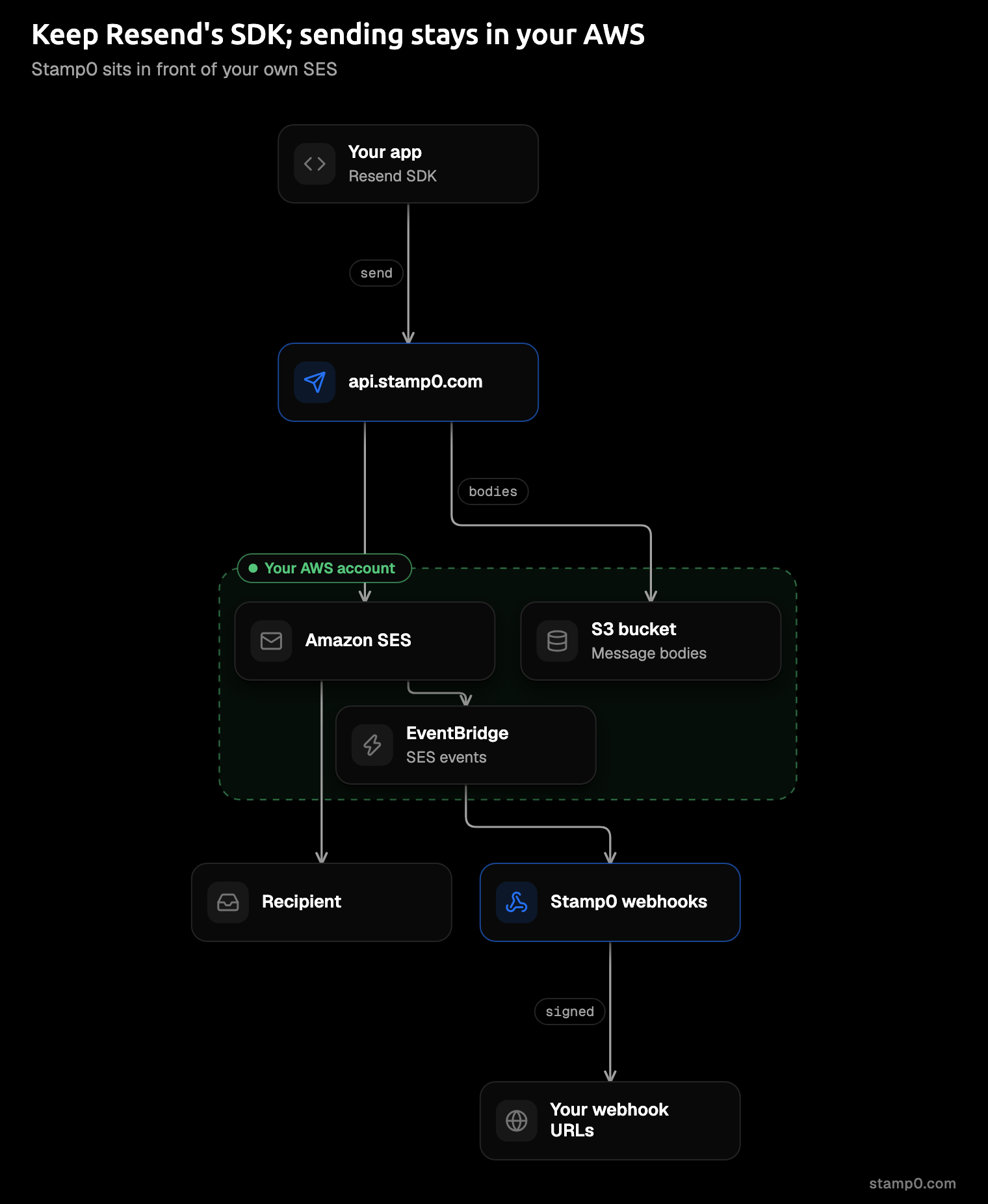
You can split the difference: keep a managed API on top and put the sending in your own AWS account. A layer like that speaks a Resend-compatible API, so your code stays put; it drives SES for you and charges a flat fee while AWS bills the mail. Stamp0 is one, and we make it.
Your code keeps the Resend SDK and points it at api.stamp0.com. SES in your AWS account sends the mail, on your bill and your sender reputation. Bodies, attachments and raw inbound mail land in an S3 bucket you own, while reputation, suppressions and quotas stay in your AWS account (what we keep, and why).
What it adds over SES alone:
- One stack. A CloudFormation Quick Create link sets up the role, event routing and bucket for about $0.40 a month in AWS charges, with no Lambda to patch (connect AWS).
- DNS written for you. On Route 53 the stack option writes the DKIM, MAIL FROM and DMARC records for you (MAIL FROM on a
send.orbounce.subdomain); on Cloudflare DNS you connect your account and they're published when you choose Publish on Cloudflare; anywhere else you get a copy-paste list (domains). An existing DMARC policy is left alone. - A dashboard and an event log, showing the latest delivery status of every email, with bounce and complaint rates measured against SES's own review thresholds.
- The sandbox request, drafted. Stamp0 writes the production-access request; you're the one who sends it.
- Webhooks in Resend's format for email events, signed and retried (webhooks).
- Marketing: contacts, campaigns, sequences and one-click unsubscribe, with the sends on your AWS bill like any other mail. Free covers 1,000 contacts and 10,000 marketing emails, and Scale 100,000 contacts. Pro covers 10,000 contacts for $15, where Resend's paid marketing plans start at $40 a month for 5k.
Stamp0 is free up to 50,000 emails a month, then Pro at $15 or Scale at $49, flat per workspace and never per email, on top of the AWS bill (pricing).
AWS credits change the math again. New AWS customers get up to $200 in Free Tier credits, usable on SES within 12 months. At $0.10 per 1,000, $200 covers 2,000,000 emails, before any other AWS charges. Resend doesn't take AWS credits. The credits pay the AWS side; Stamp0's flat fee is billed on its own. If you're a new AWS customer paying Resend by card while those credits sit unused, they could be paying for your sending instead.
When Resend or SES direct is the better pick
Stamp0 plus SES is our pick from 50k up. Cheap is a good reason to move, and these are good reasons to stay put.
- You send under 3,000 a month. Resend Free is $0 and Stamp0 Free plus SES is about $0.30, so call it a tie; Stamp0 Free keeps going to 50,000, past Resend Free's 100-a-day cap.
- Your app only speaks SMTP. Resend has an SMTP endpoint and Stamp0 is HTTPS only, so stay on Resend or use SES's own SMTP interface.
- You want one bill. You'll get two, AWS and Stamp0. Together they still come to less than Resend's at every volume in the table.
- You don't have an AWS account. You'll need one, and it starts in the sandbox; the one-click stack and the drafted request above take most of the work out of it.
- You want inboxes on a free plan. Resend includes 3 on every plan, Free too; Stamp0 Free has 1 and Pro has 10.
- You'd rather Resend ran the IP pools. Resend runs its own IP pools. On SES you send from SES's shared pools, or rent a dedicated IP for $24.95 a month (Resend charges $30 on Scale).
- You'd rather not bet on a younger product. Fair: Stamp0 is younger than Resend. It's free to 50,000 emails a month, so run it beside Resend first.
- You'd rather build the dashboard yourself. Then SES alone is $15 a month cheaper than Stamp0 plus SES from 100k up, and the console is all yours.
If you fit under Resend's free cap, stay where you are and spend the afternoon on your product.
Switching from Resend: two settings
Moving between two APIs with the same shape is a config change, not a rewrite. With Stamp0 the Resend SDK stays and two values change.
-
Switch SES to à la carte in every Region you send from, using the steps above.
-
Connect AWS and verify your domain again in Stamp0.
-
Point the SDK at Stamp0:
RESEND_API_KEY=your-stamp0-api-key
RESEND_BASE_URL=https://api.stamp0.com
If you configure the client in code instead, pass
baseUrl. -
Recreate your webhooks with the same URLs; the payloads match.
We verified this with the real resend@6.32.0 Node client; other Resend SDKs are untested by us.
A few things don't carry over: Resend automations and event definitions, delivery of contact.*, topic.* and suppression.* webhooks (accepted, not delivered), and the react field. If you use the Node SDK, it renders React Email to HTML before it sends, so your templates still work. IDs come prefixed, like em_….
Run both side by side and move traffic when you're ready. Try it on one transactional stream, password resets say, before you move the newsletter. The whole diff is two lines of config, the kind of pull request that gets approved before the coffee cools.
The full checklist is in Migrate from Resend.