The demo went well. You pointed the agent at your Gmail, it summarized a thread and drafted a decent reply, and for an afternoon it felt like hiring help. Then you pictured it reading everything else in there: the invoice thread, the password resets, and the email from a stranger that says "ignore previous instructions."
The model isn't the problem. The credential is. That OAuth consent screen you clicked through in a hurry granted the whole mailbox, and the right to send as you.
A safe AI agent inbox is one the agent owns: its own address on a subdomain, a key that reaches only that inbox, raw mail in your own S3 bucket, and four guardrails for the day someone emails it instructions. You get the real API calls and a comparison with the Gmail API, Resend Inboxes and AgentMail. We make Stamp0, which publishes this blog, so it's the worked example; we say where the others do better.
Why your own mailbox is the wrong inbox
Your mailbox fails on three counts: scope, injection and identity.
Start with scope. Gmail API scopes work at the account level, and none of them is limited to one label or one thread, so an agent that can read anything in your mailbox can read everything. Reading needs a restricted scope such as gmail.readonly; sending needs gmail.send, which Google describes as "Send email on your behalf."
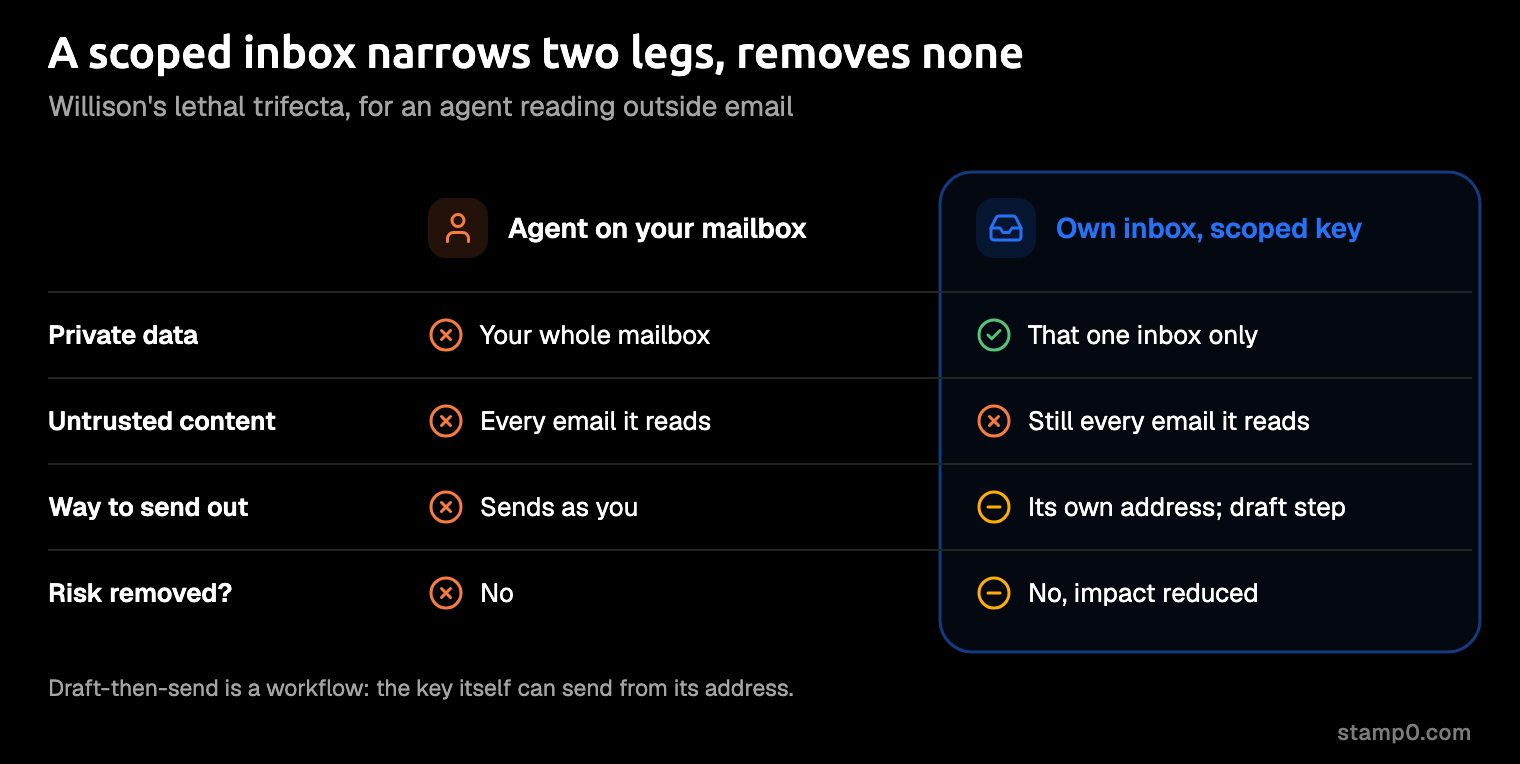
Then injection. Every email is content from a stranger, and the model reads it with the same attention it gives you. OWASP calls this indirect prompt injection: the model takes in outside content that carries instructions of its own. Your mailbox makes it worse, because it also holds your private data and the way out. Simon Willison calls that mix the lethal trifecta: access to private data, exposure to untrusted content, and the ability to communicate externally. It isn't hypothetical. In EchoLeak (CVE-2025-32711, CVSS 9.3), one crafted email got Microsoft 365 Copilot to leak data without anyone clicking anything.
And identity. When the agent replies, it replies as you, from the address that gets your bills, your contracts and the fraud alerts from your bank. The vendor on the other end can't tell your considered answer from a confident guess by the agent, and they'll hold you to both.
There's an operational tax as well. If your app requests restricted scopes and reaches the data through a server you run, it needs a security assessment from a Google-approved assessor. Some exceptions, such as personal use, skip it; everyone else repeats it at least every 12 months. And while your app is in Testing, its refresh tokens expire after 7 days.
An agent should get its own address the way a contractor gets their own badge. It opens the doors the job needs, and you can switch it off without changing every lock in the building.
Three ways to give an agent an inbox
There are three ways to do this: the Gmail API on a real mailbox, a hosted inbox product such as Resend Inboxes or AgentMail, or an inbox API on your own domain with the mail in your own cloud account.
Pick on two things: what one key can reach, and where the raw mail sits. Agent features get added later; a key that reaches too much, or mail stored in the wrong place, is hard to undo once your agent is live. Many comparison pages count features, which is how the tool with more buttons beats the one with the right lock.
The table uses the vendors' docs and pricing pages as of 2026-11-02. Where a cell says "Not found", we could not find it in the pages we read.
| Gmail API on your mailbox | Resend Inboxes | AgentMail | Stamp0 | |
|---|---|---|---|---|
| What one key reaches | The whole account; gmail.send sends as you | Not found | One pod or one inbox, with a permission whitelist; allow and block lists for addresses | One inbox; other inboxes answer 404 |
| Where raw mail lives | Your Gmail mailbox | Not found | Not found | The original message (raw MIME) in your S3 bucket |
| Drafts and sending | Up to your code; sends go out as you | Built-in agent drafts and never sends on its own | Keys can be limited to permissions such as message_reply | Draft endpoints and a separate send call; approval is your workflow |
| Injection scan | n/a | None found | Agent Armor: advisory, US production only | None |
| About 10 inboxes | n/a | 3 included, $1 per extra on paid plans | Developer, $20 a month | Pro, $15 a month flat, plus AWS |
| Free plan | Your existing Google account | 3 inboxes | 3 inboxes, no custom domains | 1 inbox; agent keys on Pro and Scale |
The Gmail API is the right tool when the agent has to work inside a mailbox a person already uses, like triaging the inbox of a busy founder. It's the wrong tool when you want the agent to have an identity of its own, because every grant covers the whole account.
Resend Inboxes is built for teams. Resend announced it on 2026-10-22: addresses on your domain, every message grouped into a thread. You get shared inboxes, assignment, notes, folders, labels and search. Each inbox can run a built-in agent with instructions and a set of enabled actions; Resend says plainly that the agent never sends email on its own, and it forwards only to addresses written in its instructions. Its examples authenticate with a Bearer API key and describe no further scopes. For the sending side, see Stamp0 vs Resend.
AgentMail takes key scoping seriously. A key can be scoped to one inbox or to a pod (a group of inboxes in AgentMail), and a permissions object turns it into a whitelist such as inbox_read, message_read and message_reply. Allow and block lists control which addresses and domains your agent can send to or receive from. Its Agent Armor scan labels inbound mail clear or review; it's free while in AgentMail Labs, runs in US production only, and AgentMail itself says a clear verdict "is advisory, not a guarantee." Its Free plan has 3 inboxes but no custom domains, and Developer is $20 a month for 10 inboxes and 10,000 emails.
Stamp0 is the pick for an agent that answers mail on your own product domain. One agent key reaches one inbox, and any other inbox answers 404. The raw MIME lands in an S3 bucket in your AWS account; Stamp0 keeps the metadata, like ids, recipients and subject. Authentication verdicts come from Amazon SES, the AWS email service that receives your mail, in notifications Stamp0 can authenticate, not from headers the sender wrote. The flat Pro price sits on top of your AWS bill for SES.
Three weak spots, plainly. Stamp0 Free has 1 inbox and agent keys start on Pro, where Resend includes 3 inboxes on every plan and AgentMail Free has 3. On Free, that one inbox with threads is enough to try receiving; Pro adds the key bound to one inbox.
There's no draft-only key either, so approval is something you wire, as the guardrails below show.
And you need an AWS account, because receiving runs in it. A new SES account also starts in the sandbox, which blocks replies to unverified addresses until AWS grants production access. Stamp0 drafts that request for you; the sandbox guide covers the rest.
Set up an agent inbox on your own domain (Stamp0 example)
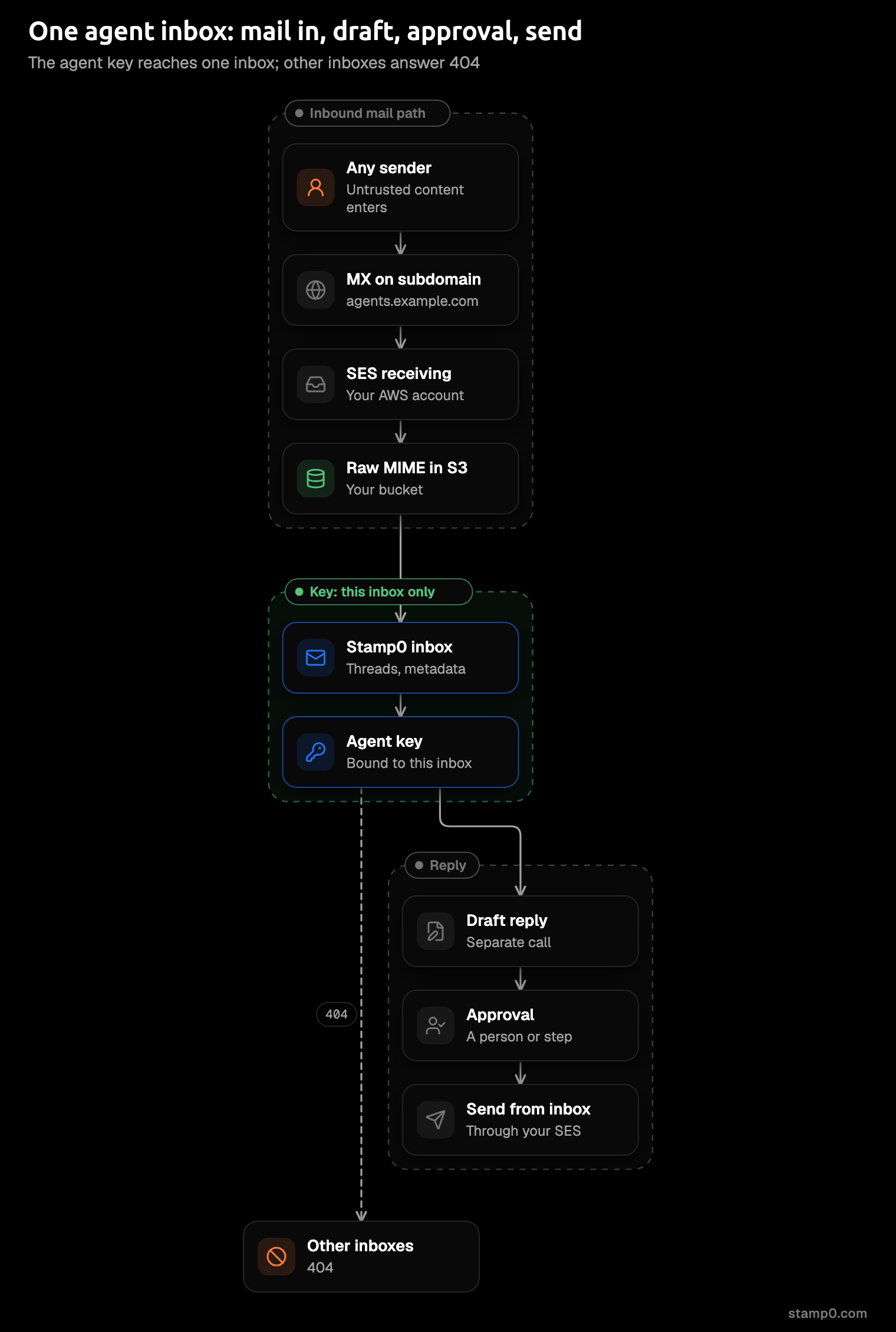
Whatever you build on, the chain is the same. DNS sends mail for a domain to a receiving service, the service stores it and groups it into threads, the agent reads with a narrow key, and replies leave from the same address.
With Stamp0, receiving runs in your AWS account. SES receives mail in one of its receiving regions, such as us-east-1 or eu-west-1, and the CloudFormation stack you deployed holds the receipt rule, the SES rule that says what happens to incoming mail. Every receiving resource apart from the S3 bucket has to sit in that same region. If you haven't connected AWS yet, Connect AWS covers the stack, and Inbound and inboxes is the full reference for the steps below.
1. Pick a subdomain and turn on receiving
Pick a domain or subdomain, such as agents.example.com, whose MX record you can point at SES. An MX record is the DNS entry that says which server takes mail for a domain. The usual reason for a subdomain: an MX record is named for the domain it receives for, so the mail your team gets on the root can keep its own record. Check which name the record lands on before you save it.
Then make three things true:
- Receiving is enabled on the domain (
capabilities.receiving), which adds the MX record. - The address or domain is in the stack's
InboundRecipients, withEnableInbound=true. - The Stamp0 receipt rule is in your account's active rule set.
receiving.setup tells you which of the three is missing, and receiving.status reads enabled once they all hold. The MX record itself follows the AWS format: named for the receiving domain, priority 10, pointing at inbound-smtp.<region>.amazonaws.com. For a subdomain in us-east-1, that's:
agents.example.com. MX 10 inbound-smtp.us-east-1.amazonaws.comThe rest of your DNS for the domain is in Domains.
2. Create the inbox
Create the inbox with POST /inboxes. address takes a local part or a full address, and domain_id is the dom_ id of your domain.
curl -X POST https://api.stamp0.com/inboxes \
  -H "Authorization: Bearer $STAMP0_API_KEY" \
  -H "Content-Type: application/json" \
  -d '{"name": "Support agent", "address": "support", "domain_id": "DOMAIN_ID"}'
The response carries the new inbox id, address and status. An example, trimmed to those fields, with a placeholder id:
{
  "id": "INBOX_ID",
  "address": "support@agents.example.com",
  "status": "active"
}
Every field is in the API reference.
3. Create a key bound to that inbox
Create the key for your agent with POST /api-keys, passing permission: "sending_access" and the inbox id.
curl -X POST https://api.stamp0.com/api-keys \
  -H "Authorization: Bearer $STAMP0_API_KEY" \
  -H "Content-Type: application/json" \
  -d '{"name": "support-agent", "permission": "sending_access", "inbox_id": "INBOX_ID"}'
That key reads the threads, messages, drafts and received mail of that inbox, and sends only from its address. Ask it about another inbox and the answer is 404; ask it to create, change or delete an inbox and it can't.
This is the step the Gmail route can't do: no Gmail scope covers one corner of your mailbox.
4. Let the agent read threads
Your agent starts its loop with unread threads:
curl "https://api.stamp0.com/inboxes/INBOX_ID/threads?unread=true" \
  -H "Authorization: Bearer $AGENT_KEY"
Threads group messages by Message-ID, In-Reply-To and References, so a reply chain arrives as one conversation. The list also filters by query, label and status, and three more calls take you from a thread to the original message.
GET /inboxes/INBOX_ID/threads/THREAD_ID/messages    pages through one thread
GET /inboxes/INBOX_ID/messages/MESSAGE_ID           bodies from your bucket, inbound or outbound
GET /emails/receiving/EMAIL_ID                      raw.download_url for the original .eml
That download URL is a presigned link to the original message file, and it lasts at most one hour.
5. Draft the reply, then send it
Drafts live at /inboxes/:id/drafts, where they can be created, edited and deleted. Sending one is its own call, which sends the draft and deletes it. The agent key can read those drafts and send from the inbox address. Who writes the draft is your choice. A common wiring: the agent proposes the text, your own code saves it as a draft, and a person or your approval step sends it.
POST /inboxes/INBOX_ID/drafts                      your code saves the proposed reply
POST /inboxes/INBOX_ID/drafts/DRAFT_ID/send        a person, or your approval step, sends it
Once you trust a category of mail, the agent can reply directly. POST /inboxes/:id/threads/:threadId/reply takes text, reply_all and an optional message_id; the reply goes to the Reply-To address of the sender (or From), never to the inbox itself, with a Re: subject and headers that keep it in the thread.
curl -X POST https://api.stamp0.com/inboxes/INBOX_ID/threads/THREAD_ID/reply \
  -H "Authorization: Bearer $AGENT_KEY" \
  -H "Content-Type: application/json" \
  -d '{"text": "Thanks, the invoice arrived. We will confirm payment by Friday.", "reply_all": false}'
When the conversation is done, PATCH /inboxes/:id/threads/:threadId closes it; the same call sets labels and marks it read.
You'll remember the first reply you let it send without reading. Make it a boring one.
Guardrails against prompt injection in incoming mail
You can't filter prompt injection out of email, so the job is to limit what a successful one can do. OWASP says it's unclear whether fool-proof prevention exists, and recommends least privilege, human approval for privileged operations, and marking untrusted content. The UK NCSC goes further: prompt injection will remain a residual risk that "cannot be fully mitigated with a product or appliance," and an LLM processing email from outside senders shouldn't have privileged tools.
So the guardrails aim at impact: what the agent reads, what it can send, and what you can reconstruct afterward.
Treat every message as data
Put message bodies into the prompt as quoted content from outside, never as instructions. Don't rely on reading them first, either: OWASP notes that injected text doesn't need to be visible to a human, only parseable by the model.
Then trim the tool list. An agent that reads outside mail shouldn't also hold tools that reach other data or other addresses, because that hands it all three legs of the trifecta. For a Stamp0 agent, that means its one key and the inbox calls, and nothing that touches your CRM, your billing system or your other inboxes.
Gate on the verdicts
On SES receiving, every email Stamp0 receives has a verdicts object with spf, dkim, dmarc, spam and virus; Cloudflare receiving has no virus verdict. The verdicts come from SES notifications Stamp0 authenticates, not from the message headers, so a sender can't write their own; Security covers how. The SES notification docs define each result, including GRAY, which for DMARC means SPF or DKIM passed but the sending domain has no DMARC policy or uses p=none.
Route anything that isn't a DMARC pass to a person, especially mail that claims to come from a vendor, a bank or you. Keep the limit in mind: a verdict says the sending domain checks out, not that the text is safe. A perfectly authenticated email can still carry instructions.
Draft first, send second
Split the draft and send calls between two parties. The agent proposes a reply, your code saves it as a draft, and the send call stays with a person or with an approval step a person clicks. Stamp0 doesn't enforce the split, because the agent key can send from its address. The split holds only while the send and reply calls stay out of the tools you hand your agent.
The key also fixes the address your agent sends from, not who receives the mail. AgentMail goes further here, with allow and block lists for the addresses and domains an agent can send to. Stamp0 has no such list, so your approval step is the check on recipients.
Start with every reply as a draft. Once you've read enough drafts to stop wincing, pick one dull category, such as confirming that an invoice arrived, and let the agent reply to that alone.
Keep an audit trail
Keep your own log of agent mail. The Stamp0 audit log records configuration changes, and the sends, replies and drafts an agent key makes aren't in it. So record every call the agent makes: the request, the draft id, who approved it, and what went out.
When a customer asks why the agent said that, you want the answer to be one query, not an archaeology project.
Put together, the trifecta doesn't disappear. Untrusted content still arrives with every message; what narrows is the private data, now one inbox, and the sending identity, now one address. Who that address writes to is still up to your draft step.
When something else fits better
Stamp0 fits an agent with its own address on your domain. Other jobs have better tools:
- A human support team that wants an assistant: Resend Inboxes, for shared inboxes, assignment and notes, with an agent that drafts and never sends on its own.
- A hosted service with an injection scan and recipient lists: AgentMail, knowing Agent Armor is advisory and runs in US production only. Its Free plan is a quick way to try it, without a custom domain.
- An agent that must act inside a person's mailbox: the Gmail API, with its security assessment every 12 months and its token rules.
- A framework that only speaks IMAP or SMTP: a real mailbox. SES's inbound endpoints aren't IMAP or POP3 servers, and Stamp0 is HTTPS only.
Choosing the wrong one isn't fatal. It just means you migrate later, usually on a deadline.
FAQ
Can an agent's key be limited to drafts only?
Not on Stamp0; keep the send call out of your agent's tools, as the guardrails above describe. If you need the limit inside the key itself, AgentMail permissions do that.
Will Stamp0 stop prompt injection?
No. The NCSC says no product can, and OWASP isn't sure fool-proof prevention exists. Your own inbox, a key bound to it, drafts before sends, and treating mail as data limit what a successful injection can do. On a bad day you delete a strange draft instead of explaining a leak.
Does this replace my company's mailbox?
No. Your agent gets its own address on a domain or subdomain whose MX record points at SES, and your team keeps its own mail.
What does it cost?
As of 2026-11-02, Stamp0 Pro is $15 a month flat for 10 inboxes. On top, AWS bills you for SES inbound at $0.10 per 1,000 messages plus $0.09 per 1,000 chunks of 256 KB. The plans, Free included, are on pricing.
Start with one inbox and one key
The smallest useful version is one inbox, one agent key, and every reply as a draft. Connect the MCP server with that agent key as its API key, and the MCP inbox tools, inboxes.threads and inboxes.reply, reach only that one inbox; any other answers 404. Your agent gets a desk of its own, and your inbox goes back to being yours.